

If you’re looking to integrate Salesforce with a Python web application, Flask, and simple-salesforce are two powerful tools that can help you get the job done quickly and easily.
In this blog post, we’ll show you how to set up a Flask application that connects to Salesforce using simple Salesforce and create a simple form that allows users to create orders in Salesforce.
Before we get started, let’s briefly review what Flask and simple Salesforce are and why they are useful for integrating with Salesforce
What is Flask and Simple Salesforce
Flask is a lightweight web framework for Python that allows you to quickly create web applications without getting bogged down in the details of HTTP requests and responses. Simple-Salesforce is a Python library that provides a simple interface to the Salesforce API, allowing you to easily create, read, update, and delete Salesforce objects from your Python code.
Setting Up the Environment
To get started, you’ll need to install Flask and simple Salesforce. You can do this using pip, the Python package manager:
pip install flask simple-salesforce
You’ll also need to create a Salesforce account if you don’t already have one, and generate a security token that you can use to authenticate with the Salesforce API.
You can get your security token by clicking on your Salesforce profile then Settings –> My Personal Information –> Reset My Security Token.
Once you have these in place, you’re ready to start building your Flask application.
Creating the Flask App
To create the Flask app, you’ll need to:
Create a new folder in your development environment. In that folder create two folders templates and static.
In the parent folder create a Python file in which we will be writing code for Flask and simple Salesforce.
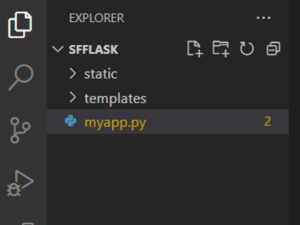
your project structure should look like this.
In “myapp.py” use this code:
In this code :
When a POST request is received, the application retrieves data from the submitted form (account name, effective date, and status) and uses the Salesforce API to perform a query to find the account ID based on the account name.
If the query returns no results (i.e., there is no existing account with the given name), the application creates a new account with the given name and then creates a new order associated with that account. If the query returns one or more results (i.e., there is an existing account with the given name), the application creates a new order associated with each account returned by the query.
Now create a front-end form to take the information which is required to create an account and an order. *Create this HTML file *“orderForm.html” inside templates folder.
You can also use some CSS to make the form look presentable
So from this now we have an HTML form that looks like this. You can modify it to your liking with more CSS.

Testing the App
Now let’s test the app by creating some orders
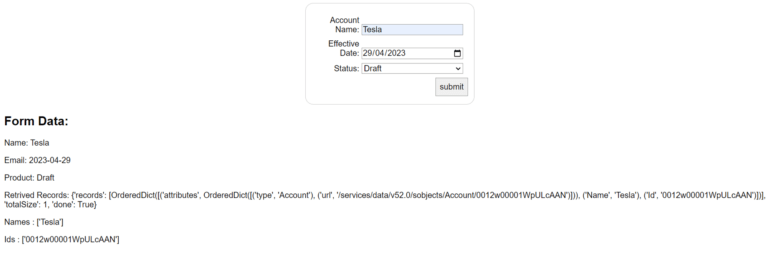
Here we created an order for Account Tesla which was already created and we can see if that order got created in our salesforce org or not.

The order got successfully created for this Account.
Now let’s try to make an order for an account that does not exist.
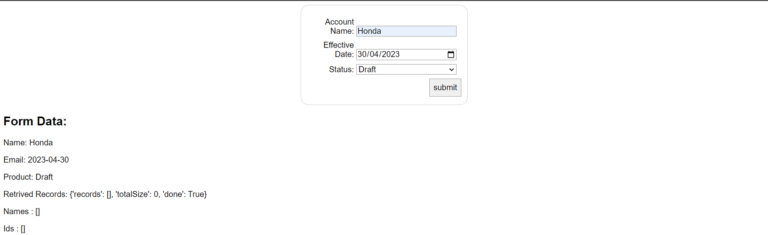
In this, we can see when we try to make an order for an account Honda. In retrieved records, we got no records because it does not exist in our salesforce org.
So it should have created an account, Honda. And then created an order for that account.


And we got the expected result as it created the account Honda and an order for that.
Congratulations! You have successfully created a sales order in Salesforce using a Flask app and Simple Salesforce.
Conclusion
In conclusion, this blog demonstrated a simple yet powerful way to integrate Flask with Salesforce using the Simple Salesforce library. We were able to create a web form that allowed users to create an order in Salesforce, all with just a few lines of code.
Try out the Salesforce solution for yourself and be sure to share your valuable suggestions with us. Until the next one, stay connected!





