
Modern enterprise apps demand real-time responsiveness, but traditional Salesforce development often slows you down with Apex, SOQL, and frequent deployments. Enter Change Data Capture (CDC), a powerful Salesforce feature that streams real-time changes (create, update, delete, undelete) directly into your Lightning Web Components (LWC), using the Emp API and without writing a single SOQL query.
Think of CDC as PushTopic 2.0, no query definitions, no polling, and no backend logic required. You subscribe to a change stream like /data/OpportunityChangeEvent, and boom: your UI reacts in real time to record changes made anywhere in Salesforce (or via API).
In this blog, you’ll learn how to use CDC with LWC to build a live-updating progress bar based on the Opportunity StageName field. This component updates automatically when the record changes, and vice versa, making it ideal for dynamic sales pipelines, dashboards, or workflow visualisations.
What is CDC in LWC?
Change Data Capture (CDC) is a Salesforce feature that allows you to receive real-time updates of data changes (create, update, delete, undelete) for Salesforce records. In Lightning Web Components LWC, CDC is typically used with platform events and the Emp API (Streaming API) to subscribe to changes and update the UI automatically when data changes.
It’s a new version of Push Topic i.e no use of SOQL. In CDC you don’t need a SOQL query to generate a notification.
Use of CDC
- Real-time Data Synchronization: Keeps data in sync between systems (e.g., syncing operational databases with analytics platforms).
- Data Warehousing and ETL Optimization: Reduces load on source systems by only processing changed data, making ETL more efficient.
- Auditing and Compliance: Tracks data changes over time, helping with regulatory audits and data lineage tracking.
- Event-Driven Architecture: Triggers workflows or business logic based on data changes.
- Backup and Recovery: Facilitates incremental backups by capturing only what has changed since the last backup.
- Receive notifications: Get Salesforce record changes, including create, update, delete, and undelete operations.
How to Enable CDC
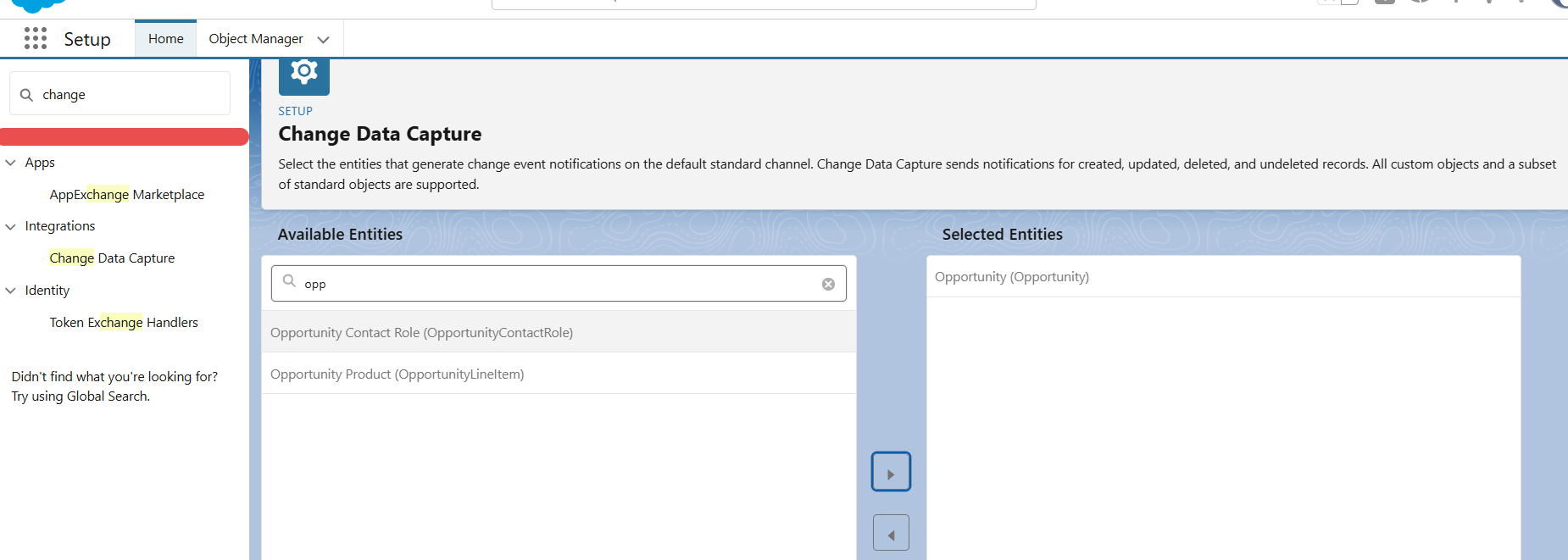
Go to setup, Search ‘Change Data Capture’ in Quick find box, click on change data capture and then select your required object and save.
I choose Opportunity for my requirement.
Sample JSON Response for update case:
This sample JSON contains information about all changes made to a particular object in the update case.
In the JSON below, we have updated the CloseDate, ExpectedRevenue, StageName, Probability, and Type.
Sample JSON Of Create Case:
In this blog, we will see how CDC can be used in LWC in Update case.
Now, let’s create a custom LWC component to update custom progress bar values on the basis of ‘Stage’ Update and if the value is updated from the progress bar, then it will also reflect on the record field ‘Stage’.
Html.
Css.
JS.
Apex class :
- handleSubscribe(): Subscribes to a CDC event channel (e.g., /data/OpportunityChangeEvent) so your component can receive real-time updates when a record changes (created, updated, deleted, etc.).
-1 means “start listening from new events only”, not from older stored events.
- handleUnsubscribe(): Stops the component from listening to CDC events by removing the subscription.
- Calls unsubscribe() to stop receiving events by removing the subscription.
- Useful for cleanup when the component is destroyed or navigated away from.
- registerErrorListener(): Registers a global error handler for any issues that occur while receiving events via the EMP API.
Sets up a callback via onError() to log or handle errors from the subscription system (e.g., network issues, auth errors, invalid channel, etc.)
Watch the Demo Video
https://www.youtube.com/embed/6GGc3oezs8I?si=G-6WHmnZSDil8ntK
Conclusion
By integrating Salesforce CDC directly into your Lightning Web Components, you’re stepping into a future-proof, event-driven architecture where the UI stays in sync with backend data in real time without polling, SOQL, or Apex callouts.
This approach minimizes server load, improves UX, and dramatically reduces Apex dependency. Whether you’re building responsive UIs, dashboards, or real-time workflows, CDC + LWC is the fastest, cleanest, and most scalable path forward.
If you’re still using PushTopics or Apex-triggered updates, it’s time to evolve. CDC is the new real-time standard.
Frequently Asked Questions
What is Salesforce Change Data Capture (CDC)?
Salesforce CDC is a real-time event-based feature that lets you track changes (insert, update, delete, undelete) in Salesforce records and stream them to clients or external systems.
How does CDC improve performance compared to using SOQL polling in LWC?
To streamline your workflows, CDC eliminates the need for frequent SOQL queries by pushing real-time data updates to the client. This reduces server load and improves UI responsiveness without consuming governor limits unnecessarily.
Can I use CDC in LWC without Apex?
Yes, you can connect LWC directly to a CDC event channel using the EmpApi module, which lets the component subscribe to platform event streams without the need for Apex triggers or polling.
What is the difference between CDC and Platform Events in Salesforce?
While both are part of Salesforce’s event-driven architecture, CDC is specifically designed to publish record-level changes automatically, whereas Platform Events are custom events you define and publish manually for app communication.
Can CDC be used with custom objects in Salesforce?
Yes. CDC supports both standard and custom objects. You just need to enable Change Data Capture for your custom object in Setup, and Salesforce will generate a corresponding CustomObjectNameChangeEvent channel.





