

The use of related lists within the Lightning UI has one of the greatest contributions in Salesforce development as it displays and manages connected records. As a result, it delivers users with a streamlined and unified view of associated data. Lightning UI Related List API allows developers to customize and enhance these lists, resulting in more functional, intuitive, and tailored lists.
In this blog, we will walk you through the functionalities of Related List API and its usage through a practical example.
Understanding the Lightning UI Related List API
The module of Lightning UI Related List API addresses several aspects of the related list management with the help of several wire adapters, such as:
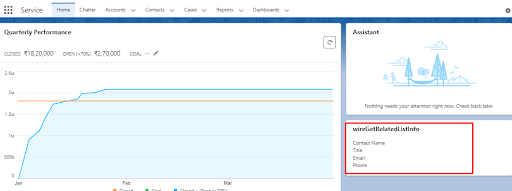
getRelatedListInfo: Fetches metadata about a specifically related list.
getRelatedListsInfo: Retrieve the metadata of multiple related lists.
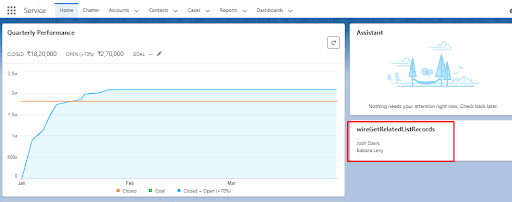
getRelatedListRecords: Collect records from related lists.
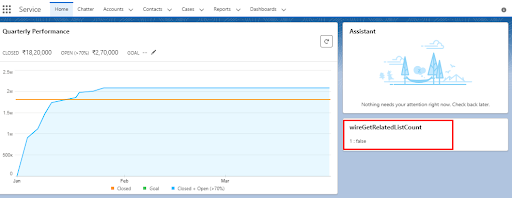
getRelatedListCount: Retrieves the count of records in a related list.
getRelatedListRecordsBatch: Fetches records from multiple related lists in batches.
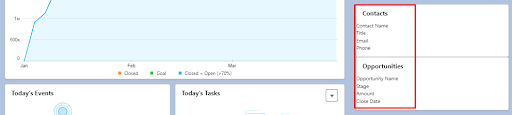
getRelatedListInfoBatch: Retrieves metadata about multiple related lists in batches.
Utilizing getRelatedListCount
One of the key wire adapters within the lightning/uiRelatedListApi module is getRelatedListCount. With the help of this wire adapter, developers can retrieve the record count within a particular related list.
Let’s have a look at its parameters and results:
Parameters:
parentRecordId (Required): Retrieve related list information via parent record ID.
RelatedListId (Required): Includes API names of related list objects, like Contacts, Opportunities, or Cases.
maxCount (Optional): Use the default value of 20 and specify the maximum record numbers to return.
Result:
Count (Integer): The number of records in the related list.
hasMore (Boolean): Indicates whether there are more records beyond the retrieved set.
listReference: Provides a reference to the related list metadata.
Let’s explore a practical implementation of the getRelatedListCount wire adapter within a Lightning Web Component (LWC):
Understanding getRelatedListInfo
The getRelatedListInfo wire adapter is like a gateway that retrieves extensie metadata for related lists.
Let’s delve into its parameters and functionalities:
Parameters:
parentObjectApiName (Required): Fetch related lists through the API name of the parent object.
relatedListId (Required): Related list object’s API name.
recordTypeId (Optional): The ID of the parent record type, if applicable.
fields (Optional): Query the related list’s fields using their API names.
optional fields (Optional): A related list of additional fields is available for querying.
restrictColumnsToLayout (Optional): Determines whether metadata should be retrieved for only the list columns or all columns in the layout.
Implementing getRelatedListInfo
Let’s exhibit how to implement the getRelatedListInfo wire adapter within a Lightning Web Component (LWC):
Understanding getRelatedListInfoBatch
Developers can fetch metadata for a batch of related lists efficiently through getRelatedListInfoBatch.
Let’s examine its parameters and functionalities:
Parameters:
parentObjectApiName (Required): Refers to the API name of the parent object whose related lists you would like to retrieve.
relatedListNames (Required): Array containing API names for related lists supported by the API.
Implementing getRelatedListInfoBatch
Let’s demonstrate how to implement the getRelatedListInfoBatch wire adapter within a Lightning Web Component (LWC):
Understanding getRelatedListRecords
The getRelatedListRecords wire adapter gives an immaculate solution for retrieving records from related lists.
Let’s examine its parameters and functionalities:
Parameters:
parentRecordId (Required): Fetch related lists through the API name of the parent object.
relatedListId (Required): This is the API name of the related list object.
fields (Optional): The API names of the related list’s column fields to query.
optional fields (Optional): Additional fields in the related list to query.
pageSize (Optional): The number of list records to return per page.
sortBy (Optional): An array of field API names to sort the related list by.
where (Optional): The filter to apply to related list records, in GraphQL syntax.
Implementing getRelatedListRecords
Let’s demonstrate how to implement the getRelatedListRecords wire adapter within a Lightning Web Component (LWC):
Understanding getRelatedListRecordsBatch
The getRelatedListRecordsBatch wire adapter enables developers to fetch records for a batch of related lists with ease. Let’s delve into its parameters and functionalities:
Parameter:
parentRecordId (Required): Fetch related lists through the API name of the parent object.
relatedListParameters (Required): Each collection contains an array of related list parameters:
1. relatedListId (Required): This is the API name of the related list object.
2. fields (Optional): You can query the column fields of the related list by using the API names.
3. optional fields (Optional): There are additional fields in the related list for query.
4. pageSize (Optional): The number of list records to return per page.
5. sortBy (Optional): An array of field API names to sort the related list by.
6. where (Optional): The filter to apply to related list records, in GraphQL syntax.
Implementing getRelatedListRecordsBatch
Let’s demonstrate how to implement the getRelatedListRecordsBatch wire adapter within a Lightning Web Component (LWC):
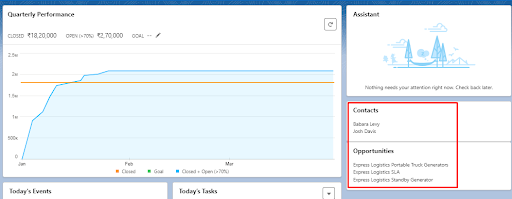
Understanding getRelatedListsInfo
The getRelatedListsInfo wire adapter provides developers with the ability to retrieve metadata for related lists in an object’s default layout. Let’s examine its parameters and functionalities:
Parameter:
parentObjectApiName (Required): Fetch related lists through the API name of the parent object.
recordTypeId (Optional): The ID of the parent record type, if applicable.
Implementing getRelatedListsInfo
Let’s demonstrate how to implement the getRelatedListsInfo wire adapter within a Lightning Web Component (LWC):
The Bottom Line
Developers can easily fetch the metadata for related lists in Salesforce Lightning components by utilizing getRelatedListsInfo from the Lightning UI Related API module. From searching related lists for Accounts, Contacts, Opportunities, or other subjects, the Related API provides an effective approach to retrieving the metadata.
Consequently, it enables developers to manage different scenarios of accuracy and error, ensuring a flawless user experience.
So, unlock the full potential of Lightning components with advanced metadata querying capabilities!





