

The Data Cloud integrates your company’s data onto Salesforce’s Einstein 1 Platform. It provides each team with a comprehensive customer view for a better experience.
The Data Cloud consolidates disparate data sources into a unified model, facilitating easy access and comprehension. It encompasses various data types such as web engagement and more from both internal systems and external data.
This unified view enables teams to gain insights into current customer needs and predict future requirements. Data Cloud empowers teams across the organization through the entire data ecosystem to enhance productivity and provide greater customer value.
By connecting Artificial Intelligence, Data, and CRM, one can transform customer engagements.
- Artificial Intelligence → It increases the productivity of the company and its employees.
- Data → The data increases every second, and every individual tracks personal data like health information. Companies track customer engagement data on websites and applications like purchases, number of clicks on particular items, etc.
- CRM → It requires immense integrations
Data Cloud, a cutting-edge feature of Salesforce, revolutionizes data management by seamlessly incorporating external data into the familiar Salesforce metadata structure.
With the help of this, organizations can transform data from diverse sources into standardized objects and fields. As a result, it becomes easily accessible within popular Salesforce applications like Sales Cloud and Service Cloud.
The platform’s design eliminates the need for complex data pipelines, significantly reducing operational complexity and maintenance costs. Data Cloud emphasizes user-friendliness, offering tools that require minimal coding expertise, thus democratizing data utilization across organizations.
By integrating all data into the Salesforce metadata framework, users can leverage powerful low-code tools such as Flow, Einstein Copilot, and Prompt Builder. This integration is a key component of the Einstein 1 Platform, which aims to provide a comprehensive understanding of customers based on data.
Data Cloud’s functionality is built on three core capabilities:
1. Comprehensive Data Connection
The platform offers pre-built connectors and zero-copy integrations, enabling swift data aggregation from various enterprise sources like AWS, Snowflake, and Google BigQuery.
2. Data Harmonization
Built specifically for Salesforce, Data Cloud seamlessly integrates all data into a standardized metadata model, making it directly accessible within Salesforce applications.
3. Simplified Data Activation
Data Cloud unifies scattered, complex data across the enterprise, making it easier for teams to leverage this consolidated resource for automated processes and data-driven initiatives.
The process of incorporating data from different sources involves two key steps:
- Data Ingestion
This initial phase involves importing data from the source without transformation and maintaining original fields and data types. This is achieved through connectors provided by Salesforce, creating data streams that refresh at regular intervals and populate data lake objects.
- Data Modeling
In this phase, the ingested data is mapped to the Customer 360 data model, with the resulting objects referred to as Data Model Objects.
This approach streamlines data management, enhances accessibility, and empowers organizations to make more informed, data-driven decisions across their Salesforce ecosystem.
Data Cloud User Interface:
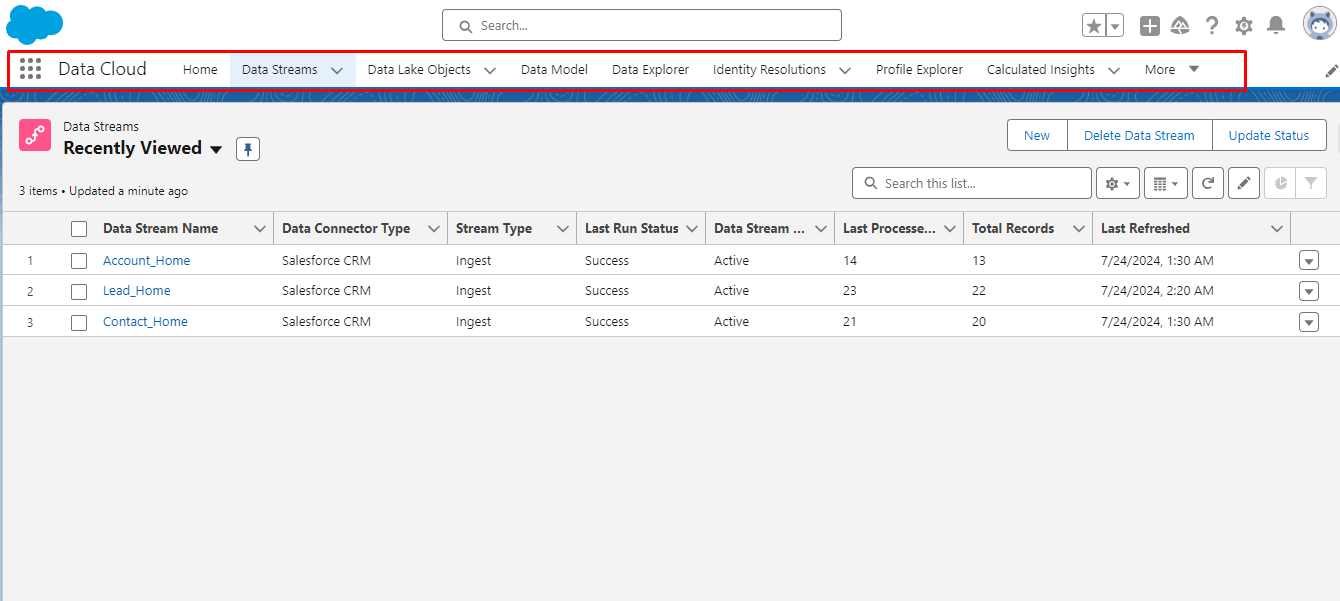
Data Streams:
Data Streams are created to bring data from an external system to salesforce and it gets stored in data lake Objects.
When a new Data Stream is created, there is an option to select Salesforce org to import the data. After selecting org, we have to select any data bundle or a specific object to create a Data stream for that bundle or object.
If a single object is selected, for example, ‘Recommendation’ then one has to select the category of the object whether it is related to Profile or Engagement or other.
If Engagement is selected then Event Time Field becomes a required field referencing the date-time fields.
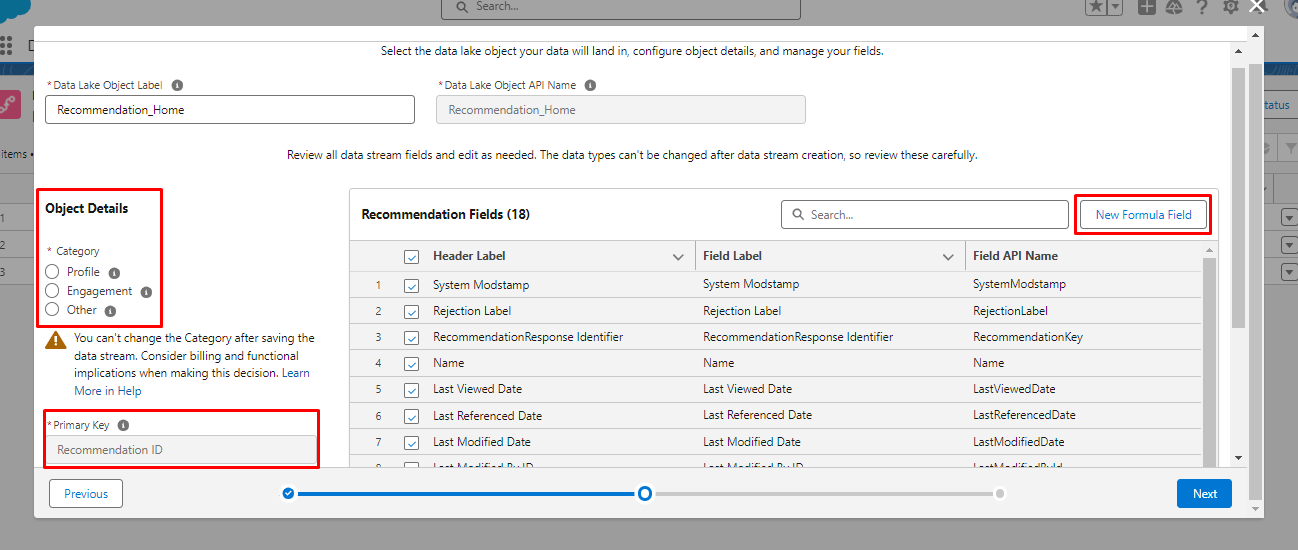
We can also create a new formula field on that object to filter the records in the data lake object.
Finally, a Data Stream looks like this. It can be refreshed anytime using the button Refresh Now and refresh history is also available in a tab.
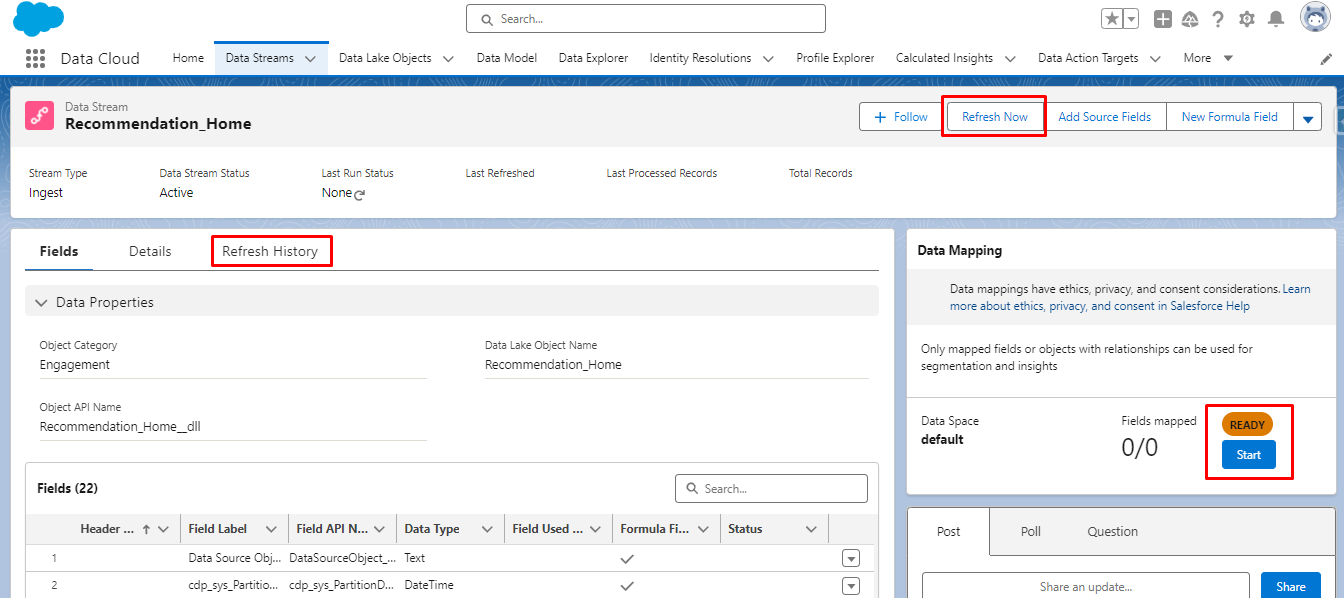
Then to do data mapping, Click on the start button.
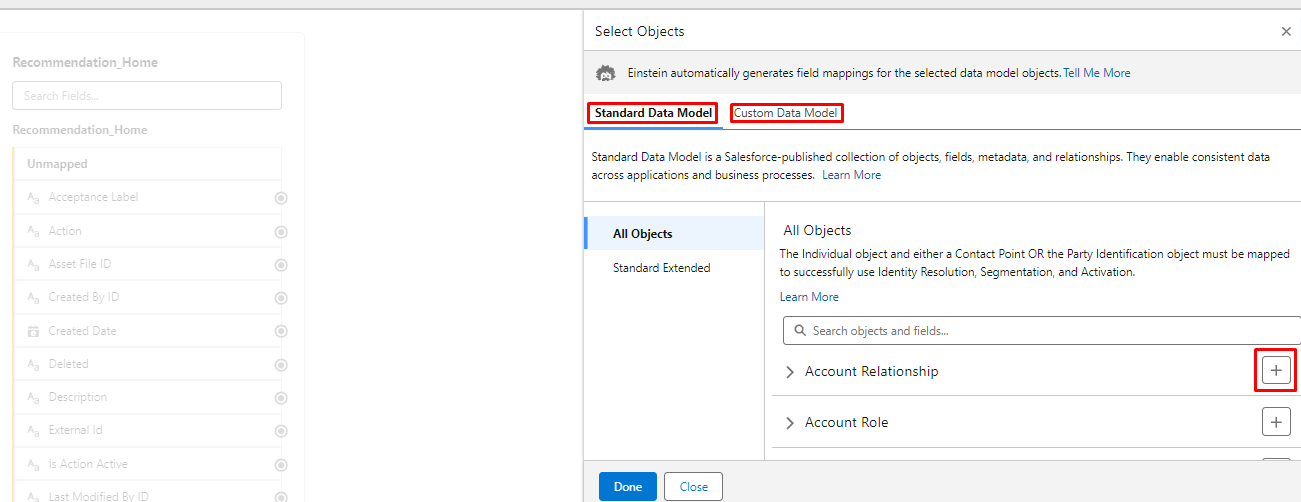
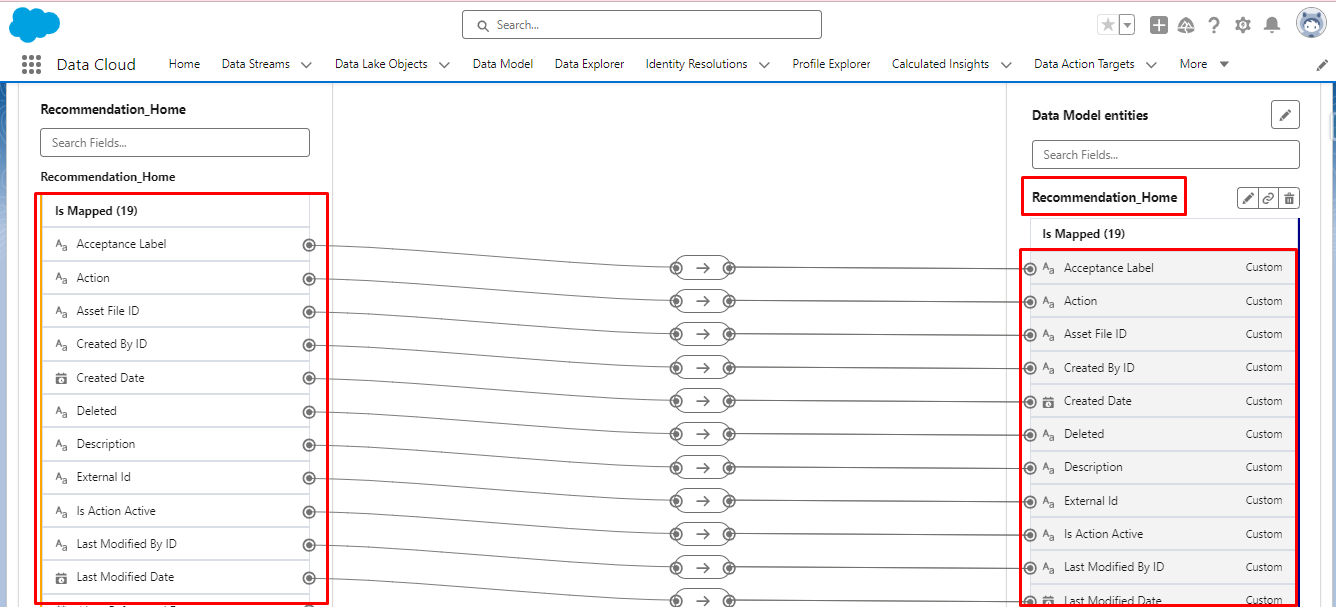
Mapping can be done using a standard data model or a Custom Data Model.
- In the Standard Data Model, different object fields can be mapped with data stream fields.
- In the Custom Data Model, a new custom object can be created with custom fields
Conclusion:
In essence, the data cloud gives a 360-degree overview of data from all sources by importing and unifying data and giving an enhanced analysis of each customer. With the help of this unified view, businesses get to understand customer preferences, helping them to make well-informed decisions.
So, get ready to transform complex data integration into a simple process, and drive business growth through data-driven insights. Stay tuned to get more valuable insights.





