

Salesforce Health Cloud is one of the most powerful tools introduced by Salesforce. Have you ever wondered what makes it a powerful tool? The answer is its unique and effective data models including a rich set of standard and custom objects. It also integrates patient data, medical records, and various healthcare-related information into a secure, centralized environment accessible to authorized users. Its vast healthcare data is tailored to the form of healthcare providers, payers, and patients.
In this blog, we are going to introduce you to Health Care Data Models that are used by Health Cloud.
Types of Health Care Data Models:
1. Household Data Model:
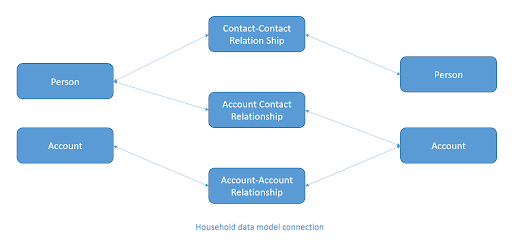
This data model keeps track of patients and the people and organizations involved in their care. It may include doctors, therapists, drivers, and family members.
There are three types of relationships in this model: Account-Contact Relationship, Account-Account Relationship, and Contact-Contact Relationship.
- Account-Contact Relationship: This shows how businesses are connected to individuals or organizations involved in patient care.
- Account-Account Relationship: This type of relationship indicates connections between different organizations involved in patient care.
- Contact-Contact Relationship: Here, it shows how individuals are connected in the context of patient care.
These relationships help healthcare providers and organizations understand the network of connections involved in patient care, facilitating better coordination and communication for improved healthcare outcomes.
2. Clinical Data Model:
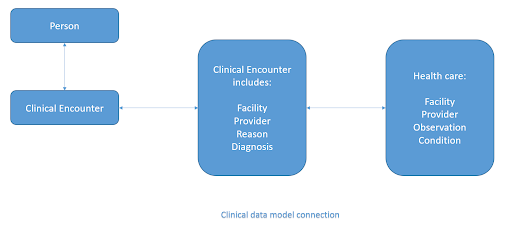
The model is carefully designed to work smoothly with the Fast Healthcare Interoperability Resources (FHIR) standard, making it easy to connect with different types of HL7 messages. This smart data model acts like a strong bridge, capable of collecting detailed information from Electronic Health Record (EHR) systems through integration middleware.
It gathers important details from EHRs, such as patient visits, chronic conditions, allergies, medications, and immunization records. By organizing all this data, it gives a complete picture of a patient’s health journey. This helps healthcare providers make better decisions and improve patient care.
3. Health Insurance and Claims Data Model:
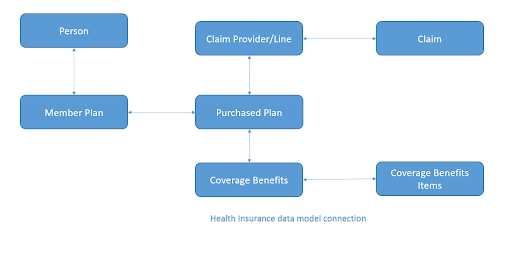
The Health Insurance and Claims data model helps manage how healthcare bills are handled. It includes details about members, their employers, insurance coverage, and family members covered under the plan. This model also keeps track of claims made to the health insurance company by healthcare providers for services, medicines, or devices given to the members.
4. Care Program Data Model:
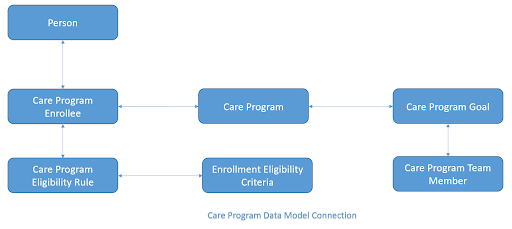
Healthcare and life science organizations create care programs to support patients in their health journeys. These programs aim to help patients follow their treatment plans, adopt healthy habits, and get financial support when needed. Care programs include things like reaching out to patients, ensuring they have access to healthcare and medications, providing financial aid, and offering fitness and wellness guidance. The Care Program data model helps you keep track of these activities so you can plan and monitor them effectively using Health Cloud.
It’s important to note that a care program is different from a care plan. A care plan helps healthcare teams coordinate care for a patient with the aim of improving their health. You can connect a care program to a care plan to make sure everything works together smoothly.
Objects include Care Program Enrollee, Care Program, Care Program Campaign, Care Program Providers, Care Program Enrollee Products, Care Program Product, Care Program Team Member, Care Program Goal, Care Program Eligibility Rule, and Enrollment Eligibility Criteria.
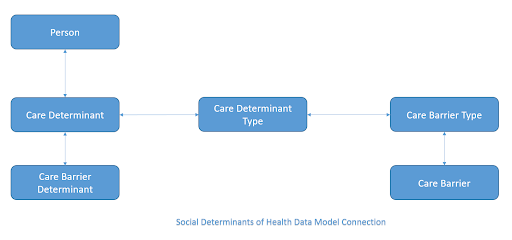
5. Social Determinants of Health Data Model:
Social determinants of health (SDOH) are the important social and environmental factors that can create obstacles to a patient’s or member’s well-being. The Social Determinants data model helps you understand the physical environment and socioeconomic status of a patient so that you get a complete picture of these factors. This helps you identify tasks for intervention to overcome care barriers and lessen health challenges for patients and members.
A common example of SDOH that is famous among us is food insecurity. When patients and members don’t have enough meals or snacks each day, or their meals are of poor quality, it can result in more visits to the emergency room than usual. The intervention involves providing access to affordable nutritious food through food debit cards, food banks, food delivery services, farmers’ markets, and subsidized meal programs.
6. Provider Data Model:
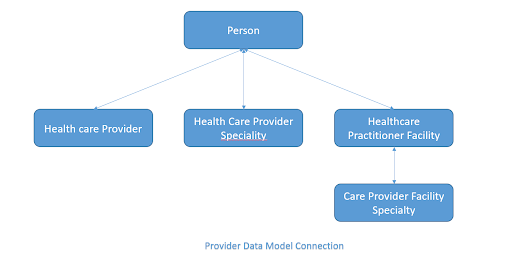
The Provider data model shows healthcare providers, like doctors and hospitals, the groups they work with, and what they specialize in and are qualified for. These include all the labs and medical facility centers who provide the services related to medical/health.
7. Utilization Management Data Model:
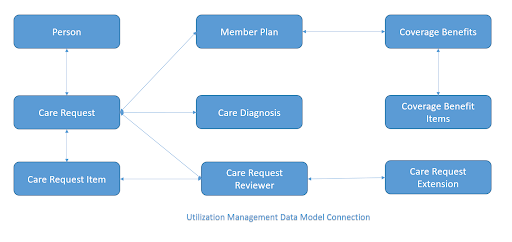
Utilization Management (UM) is a way to control how much money is spent on healthcare. It uses methods like prior approval to check if a healthcare service is needed before it’s given. UM makes sure patients get the best care, when they need it, for the right amount of time, and in the right place. OmniStudio components help users handle authorization requests and reviews easily. OmniScripts let users create and submit requests, review them with administrators, nurses, and medical directors, and discuss them with the provider who made the request.
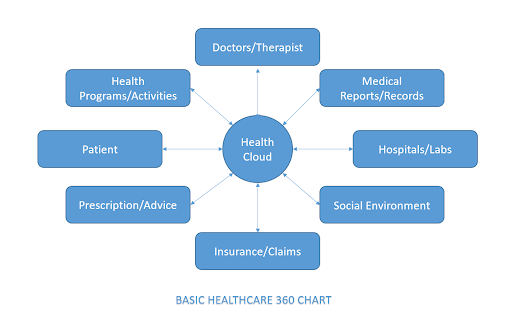
Overall Health Cloud provides a 360 health management CRM by using its powerful data model and custom objects implementation. It covers almost all the essential things related to health and services including transportation, diet, previous medical reports, doctors, hospitals and Insurance etc.
Conclusion:
So, here is the overview of the Health Cloud Data model and its uses. We’d love to hear about your experience with the solution. Keep an eye out for more interesting Salesforce development solutions on our blogs and Stay tuned for the next one.





