
For creating communication between two unrelated LWC components we use publish-subscribe mode, where one component works as a publisher and another as a subscriber.
To pass the message between two components, we use LMS(Lightning Message Service).
Lightning Message Service allows one component to publish a message to a designated channel, while other components subscribe to that channel, ready to receive and respond to the transmitted message.
We have developed a code to handle the communication between components.
In this code, we have used to generate the message channel where from one component we get a record ID and we have passed the record ID using LMS to another component.
Let’s go step by step to understand it.
Step 1: Creating Lightning Message Channel
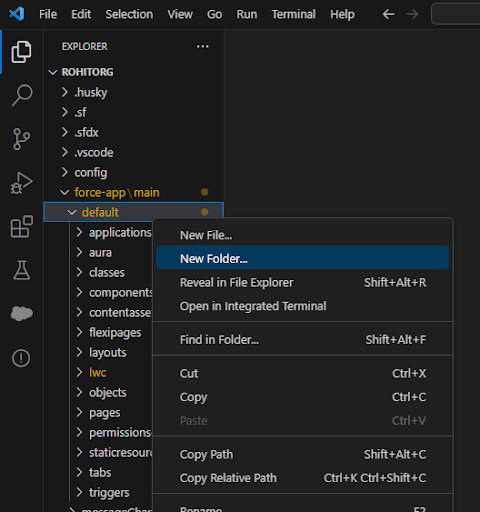
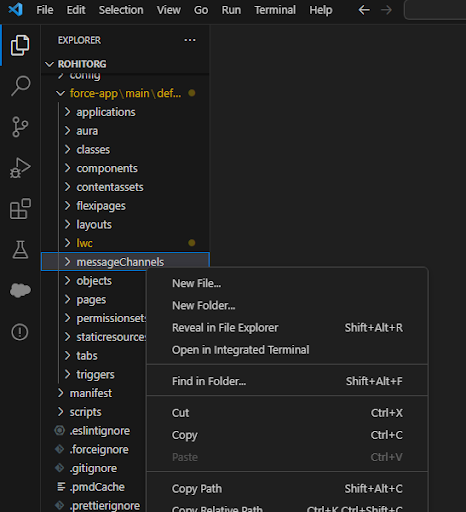
To create a lightning message channel, we have to create a folder with the name “messageChannels” under the default folder as shown below. Make sure the folder name should be the same as mentioned.
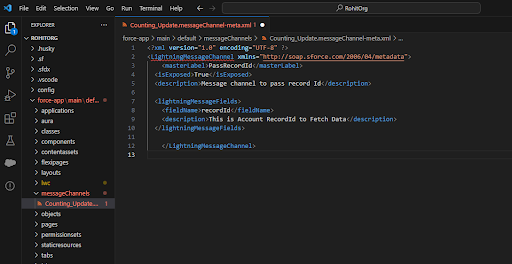
In the “messageChannels” folder create an XML file with the name format “yourMessageChannelName.messageChannel-meta.xml” and give your desired name to the message channel.
In our XML file, we have named the master label “PassRecordId” and created lightningMessageFields which defines the parameters that we can use to send the desired value using this message channel.
We have added two properties fieldName and description but you can add more fieldName and description as per your requirement.
Xml file name :: Counting_Update.messageChannel-meta.xml
PUBLISHER COMPONENT:
Step: 2 Creating Controller class to fetch account records using account name and fetching contacts using accountId
APEX Controller Class:- ContactRelationController
Step:3 Creating First Component to publish the Message
Html File Name – newAccConFatch.html
Step:4 The javascript code to handle the changes that are made
we need to import { public, MessageContext } from ‘lightning/messagingService’ through which we will get access of a messaging channel. And after that, we will import the messaging channel instance as a variable
recordSelectedId from ‘@salesforce/messageChannel/Counting_Update__c’.
Here “Counting_Update__c” is the xml file name that we have created in “messageChannels” folder with the name “Counting_Update” and appended “__c” to access it in the js file.
Javascript File Name – newAccConFatch.js
Note – “recordSelectedId” we have given the variable name to fetch the message using the Messaging Channel.
In handleRowAction we have used payload to send the message and publish the “record Id” as a message variable using Lightning Message Services.
SUBSCRIBER COMPONENT:
Step:5 Creating another Lwc component to show contacts using recordId which we will receive by messaging channel
HTML File Name – accountRecPage.html
Step:6 The javascript code to receive the massage
Javascript File Name – accountRecPage.js
We need to import subscribe,unsubscribe,MessageContext } from ‘lightning/messageService’; and recordSelectedId from ‘@salesforce/messageChannel/Counting_Update__c’;
Note – We have used subscribeToMessageChannel method to receive the “record Id” as a message from Lightning Message Channel.
Conclusion
So, here it is, our strategic guide for creating communication between two unrelated Lwc components using publish and subscribe Modal.
Try out the solution and share your experience with us. Also, stay hooked to our blogs for more interesting Salesforce development solutions. Catch you on the next one. Happy Learning!





