

Salesforce is a widely popular CRM platform, consisting of a wide range of tools and APIs that can customize and optimize your business processes. Among numerous tools, Salesforce Tooling API stands out as a versatile and essential tool for developers and administrators.
The Salesforce Tooling API is an incredibly potent interface that empowers you to construct bespoke development tools or applications for Salesforce’s Lightning Platform. It offers the ability to access metadata information within the Salesforce platform through both SOAP and REST interfaces.
The Salesforce Tooling API unveils the metadata information of an organization, which can be accessed using either REST or SOAP. This API fetches small chunks of metadata, which can be utilized to develop interactive applications or for developers’ use.
What Can You Achieve with the Tooling API?
The Tooling API is versatile and lets you do the following things:
- Retrieve the field object through metadata.
- Obtain metadata from standard and custom objects.
- Discover metadata details about Apex Classes, Visualforce Pages, and Apex Triggers.
- Fetch code coverage details of Apex classes and triggers.
- Get metadata about Validation Rules and Workflow Rules.
Use Cases of the Tooling API
The Tooling API can be used in various scenarios:
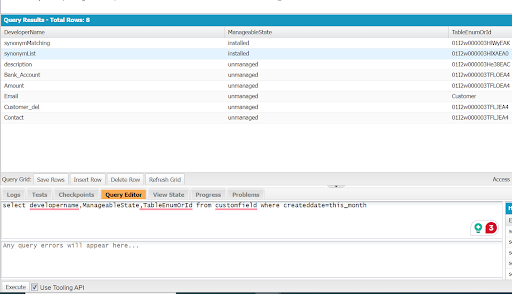
- Retrieving Custom Fields Created Within a Specific Time Frame: Salesforce admins/users often need to know which custom fields were created within a certain time frame, such as this week/month/year, etc.
- Obtaining Apex Class Metadata Information: Tooling API is used to fetch Salesforce metadata details about Apex classes.
- Retrieving Apex Code Coverage Details: It can also be used to fetch code coverage details of Apex classes and triggers.
- Retrieving Metadata Information About Validation Rules and Workflow Rules: The Tooling API can be used to fetch metadata information about validation rules and workflow rules.
The Role of Tooling API in Salesforce Developer Console
Salesforce Tooling API has a significant role in fetching the details of Custom Field. Additionally, developers can examine the metadata information in the Salesforce developer console about Custom Field.
Note: Must check the “Use Tooling API” checkbox.
Using Tooling API in the Apex class:
Use Case:
Use the Salesforce Tooling API to get the CustomObject object by DeveloperName, and then we can retrieve the list of all CustomField objects and validation rules associated with that object.
Conclusion:
In a nutshell, Salesforce Tooling API is a robust tool with a significant role in improving the overall Salesforce experience. From developing a mobile app from scratch to streamlining the processes, the Tooling API has proven to be useful for both developers and admins. Do you want to elevate your Salesforce experience with the Salesforce Tooling API? Reach out Our Salesforce Experts





