

Step into the dynamic world of Salesforce Aura Components, where user interfaces come to life. If you’re getting into the field of barcode symbols in the Salesforce app, this guide is your trusted partner. Combining the power of Aura Components with the JsBarcode JavaScript library enables seamless barcode creation in Salesforce. Use this step-by-step process to explore how to generate a barcode in Salesforce with the Aura component and transform your Salesforce app into a collaboration and productivity hub. So, let’s begin!
Objective:
Guide Salesforce developers in effortlessly integrating barcode generation into Aura Components using JsBarcode.
– Provide a user-friendly, step-by-step tutorial for seamless implementation.
– Explain different barcode types (CODE128, Code39, EAN-5, UPC) and their real-world applications.
– Help developers enhance user experience and streamline workflows with dynamic barcode features.
– Encourage exploration of JsBarcode’s customization options for tailored solutions.
Understanding Barcodes
Barcodes, those pixelated puzzle pieces of data, form a language machines fluently speak. Comprising parallel lines, dots, or geometric artistry, they are the maestros of encoding information. In the grand orchestra of technology, barcodes play a crucial role in Automatic Identification and Data Capture (AIDC).
Think of them as the silent conductors, streamlining symphonies of efficiency in realms like retail, logistics, healthcare, and manufacturing. From the checkout counter to warehouse shelves, these graphical wonders silently encode and decode information swiftly to enhance the rhythm of diverse industries.
Types of Barcodes
1. CODE128 (Unleashing Alphanumeric Brilliance)
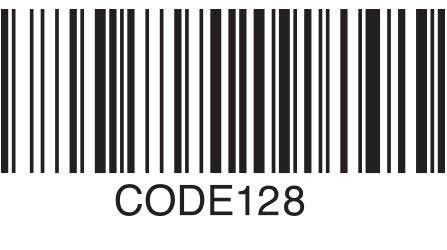
Dive into the world of CODE128, a powerhouse in linear barcodes. Loved across industries, it’s the maestro of encoding alphanumeric characters with finesse. This barcode is like a linguistic wizard, effortlessly juggling numbers and letters, making it the go-to choice for those who crave compact, versatile data representation. So, whether it’s digits or the ABCs, CODE128 weaves them into a symphony of efficiency, condensing information and leaving its mark in various sectors.
2. Code39 (The Chameleon of Barcodes)
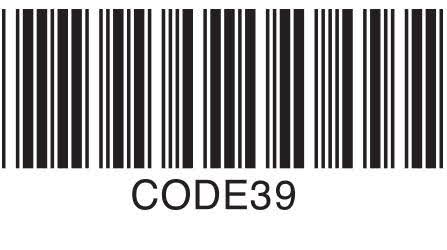
Enter the vibrant realm of CODE39, a barcode that wears many hats. Picture it as the chameleon, effortlessly blending into diverse industries. Recognized for its simplicity and versatility, CODE39 is the charismatic hero of alphanumeric encoding. Letters, numbers, and special symbols dance harmoniously under its command. Its ease of implementation and knack for encoding variable-length data make CODE39 the rockstar of barcode solutions across different sectors.
3. EAN-5 (Unveiling Secrets in Five Digits)

Meet EAN-5, the mysterious subset of EAN-13. With its five digits, including an enigmatic first one, it’s like the Sherlock Holmes of barcodes. Perfect for magazines and petite items, EAN-5 adds an extra layer of intrigue alongside its EAN-13 companion. Unraveling its digits reveals a story of inventory precision and retail tracking finesse. For those who seek the thrill of decoding, EAN-5 is the intriguing sidekick to the main barcode saga.
4. UPC-12 (The Harmonious Code of Retail Symphony)
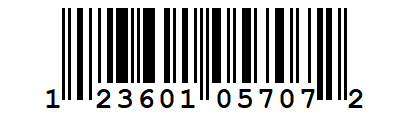
Behold the UPC (Universal Product Code), the virtuoso of retail harmony. In its symphony of bars and digits, it orchestrates the seamless exchange of product information. Like a maestro commanding the stage, the UPC transforms mundane goods into melodious data streams, guiding them through the intricate ballet of the marketplace. Ubiquitous in retail realms, the UPC’s elegant encoding transforms the cacophony of inventory management into a symphonic masterpiece of precision and efficiency. With each scan, it conducts the rhythm of commerce, ensuring products dance effortlessly from shelf to checkout.
Steps to Generate A Barcode in Salesforce with Aura Component
1. Get JsBarcode Ready
Uploading JsBarcode to Salesforce’s Static Resource – Step by Step:
- Access GitHub: Open the provided link to GitHub where JsBarcode is hosted.
GitHub Link: Download
- Download JsBarcode: Look for the download option on the GitHub page and download JsBarcode to your computer.
- Access Salesforce Setup: Log in to your Salesforce account and navigate to Setup.
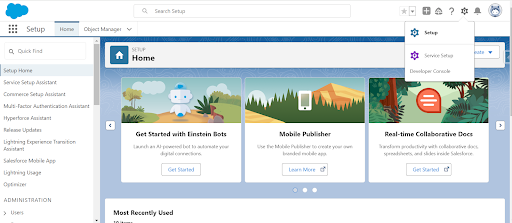
- Find Static Resources: In the Setup menu, search for “Static Resources” using the Quick Find box.
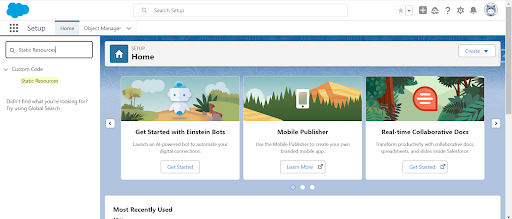
- Create New Static Resource: Click on “New” to create a new Static Resource.
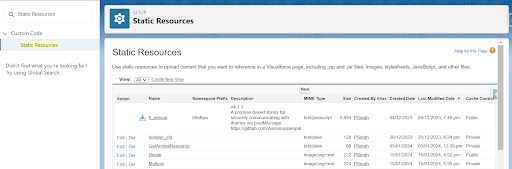
- Upload JsBarcode Files: Provide a name for your Static Resource and upload the JsBarcode folder and once the files are uploaded, click on “Save” to save your Static Resource.
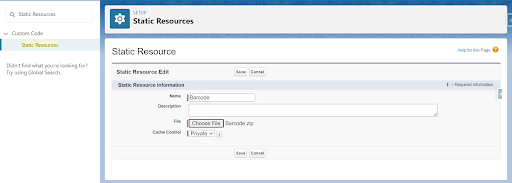
Following these steps will enable you to upload JsBarcode to Salesforce’s Static Resource, allowing your Aura Components to utilize its functionality for barcode generation.
2. Create the Barcode Hub
Creating the Barcode Generator Aura Component:
Access Salesforce Developer Console: Log in to your Salesforce account and open the Developer Console.
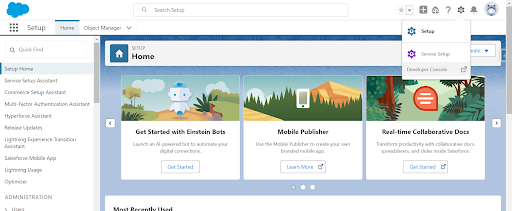
- Navigate to Aura Components: In the Developer Console, locate the Aura Components section.
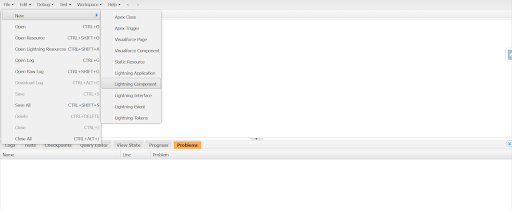
- Create New Aura Component: After clicking on New Lightning Component, give your Aura Component a name could be “BarcodeGenerator” or if you want anything different, it’s on you.
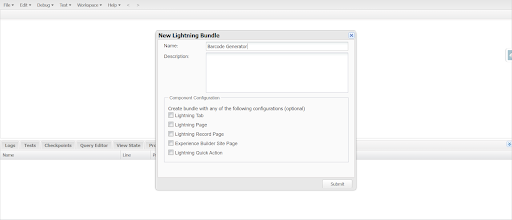
- Replace Default Code: Within the newly created Aura Component file, replace the default code with the provided special example code for barcode generation.
- Open ‘BarcodeGeneratorController.js`, swap out the code, and let the magic happen. This is where your Aura Component taps into JsBarcode’s enchanting powers.
- Replace the existing code in ‘BarcodeGeneratorHelper.js’ with the new code and witness the enchanting capabilities as your Aura Component connects with JsBarcode.
- If you wanna add CSS to make it look cooler and show your craftiness, then you are good to go.
- Save Changes:
After replacing the code, save the changes to the Aura Component file. Following these steps will allow you to create the BarcodeGenerator Aura Component in the Salesforce Developer Console, ready to be utilized for barcode generation within your Salesforce application.
3. Lightning-ize Your Barcode
Whether crafting a new Lightning App Page or jazzing up an existing one, drop in the `BarcodeGenerator` component. Adjust the `barcodeValue` attribute to your liking, and watch the barcode showtime unfold.
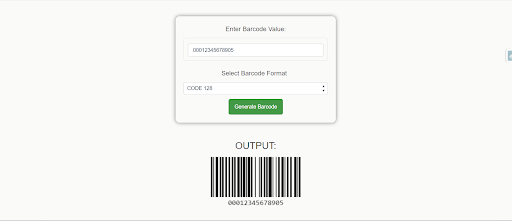
Check out the live website: https://hicdemo-dev-ed.my.salesforce-sites.com/BarcodeGeneratorBlogDemo
Conclusion:
Understanding the types of barcodes and their applications can empower you to choose the most suitable symbology for your specific use case. As you continue developing and enhancing your Salesforce application, the ability to generate a barcode in Salesforce using Aura Component adds a valuable dimension to data capture and identification processes.
Feel free to explore additional customization options provided by the JsBarcode library to tailor the appearance and functionality of your generated barcodes. And for more blogs, stay tuned!





