



What is the Remote Site Setting?
When you want to access the external sites in your Salesforce application using callouts, web services, etc, you need to add the external base URL in the Remote Site Settings. This is just security by the force.com platform to check against any malicious activities.
Before any Visualforce page, Apex callout, or JavaScript code can call an external site, you need to register that site in the Remote Site Settings page or your call will fail because Salesforce prevents calls to unauthorized network addresses.
Generally, developers and admins create Remote Site Setting through Remote Sites Section by going to the Administer and clicking on the Security Control in their Salesforce organization.
Now let’s say, you don’t want to create the Remote Site Setting manually, but still want it before any callout to an external website. Here’s how you can do it!
You need to create it via Visualforce Page using XMLHttpRequest.
Steps need to follow:
In the visualforce page, insert the Remote Site Setting with the required URL using the following steps before the controller’s API callout.
Step 1: Create an Apex Controller- “CreateRemoteSiteController”
Step 2: Create Visualforce Page- “CreateRemoteSite”
Final Result:
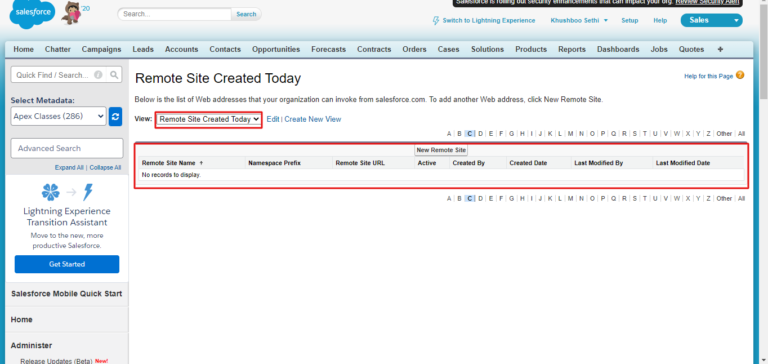
- Initial Image when there is no Remote Site Setting
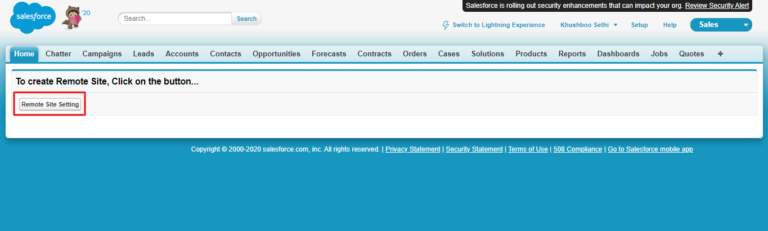
- Image while clicking the button on VF Page
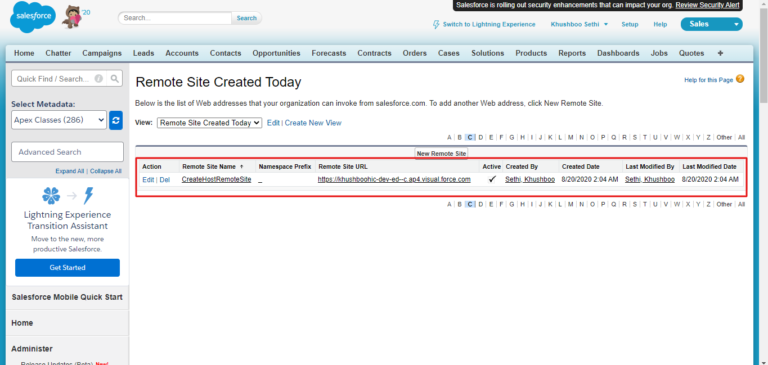
- Image after successful XMLHttpRequest on VF Page which has created the Remote site setting in Salesforce.
So, here are the two easy steps to create a remote site on a visualforce page via XMLHttpRequest. Try it out and do let us know your experience with it.
Happy learning! 🙂





