




Salesforce Lightning Component Framework is a modern User Interface (UI) framework that develops single page web applications for mobile and desktop devices. Accelerating development and app performances, it builds dynamic, responsive user interfaces for any device.
Using JavaScript on the client-side and Apex on the server side, it offers exciting tools to the developers allowing them to deploy new apps and build reusable building blocks, that are custom components, for the seamless customization of Communities, Salesforce mobile app, and Lightning Experience.
Salesforce Lightning Web Components can be built with two programming models:
- The Lightning Web Components model
- The original Aura Components model
The developers need the code editor of their choice and the Salesforce CLI to create Lightning Web Components, and the developer console to create Aura Components.
Introducing Lightning Web Components:
Leveraging the breakthrough in the web standards, a new Salesforce Lightning components programming model, the Lightning Web Components (LWC) was introduced.
Lightning Web Components are the custom elements built on the web component standards using HTML and modern JavaScript; representing the core Aura runtime by minimalizing the use of custom codes making it more secure and faster. Lightning web components and Aura components coexist and interoperate on a page, delivering unparalleled performance and appear as Lightning components to the admins and end users.
Using the core web component standards, Lightning Web Components UI framework provides the essentials to perform well in the browsers that are supported by Salesforce.
Lightning Web Components framework is lightweight and delivers exceptional performance as it uses the best native Web Components.
Prerequisites to create a lightning web component:
Step 1: Salesforce Org setup:
- Login into your existing salesforce org or sign up for the new org using
- Let’s personalize the org which we created by registering a domain by searching My Domain in quick find box.
- Once done with creating the domain Deploy to Users.
- In the quick find box search Dev Huband click enable.
Step 2: Install Salesforce CLI:
Operating System
Link to Download:
macOS
Windows 32-bit
Windows 64-bit
https://sfdc.co/sfdx_cli_win64
Debian/Ubuntu 64
https://sfdc.co/sfdx_cli_linux
Download the archive from one of the URLs in the manifest, extract the archive, then run the ./install script.
Debian/Ubuntu x86
https://sfdc.co/sfdx_cli_linux_x86
Download the archive from one of the URLs in the manifest, extract the archive, then run the ./install script.
Step 3: Download and Install Salesforce VsCode.
Step 4: Upgrade to Pre-Release org run the commandsfdx plugins:install salesforcedxin the terminal/command prompt
.
Step 5: Install the following Extension.
Salesforce Extension Pack

Salesforce Lightning Web Components.

Step 6: Create SalesforceDx Project.
- Create Project
Press “CTRL+SHIFT+P” then select “SFDX:Create Project with Manifest“

Then enter the project and select folder.

Step7: Authorize your org
Press “CTRL+SHIFT+P” then select “SFDX: Authorize an Org“

Step 8: Create your first Lightning Web Component.
- Press CTRL+SHIF+Pthen Type Web Component and then select “SFDX: Create Lightning Web Component“.
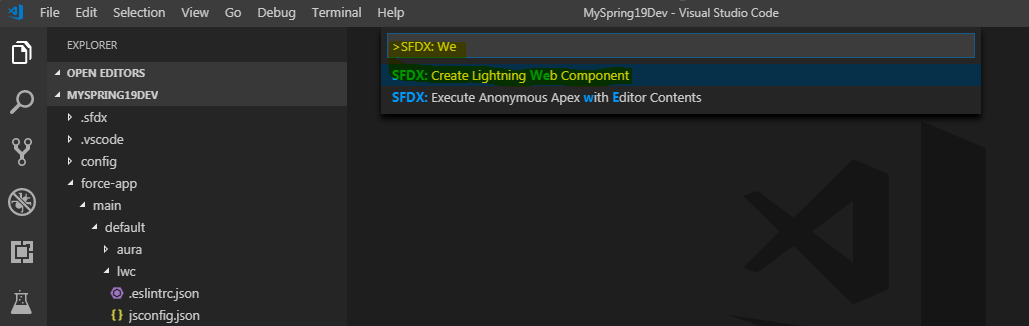
- Then Select Folder where you want to save your LWC component

- Then provide Component Name.

- Verify your components under LWC folder
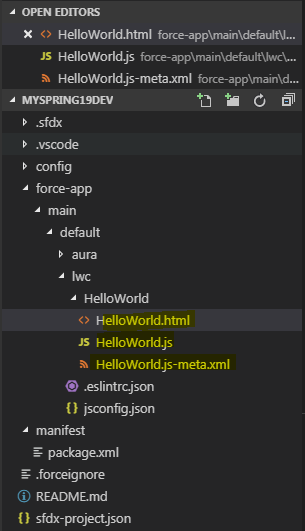
Step 9: Code for the helloWorld LWC component.
HelloWorld.html
HelloWorld.js
HelloWorld.js-meta.xml
Step 10: Deploy your component in Org
Select LWC folder and right click on same then from menu select “SFDX: Deploy Source to Org“.

Step 11: Verify your Changes with App Builder
Open your app builder and add your Custom Component on-page/App.
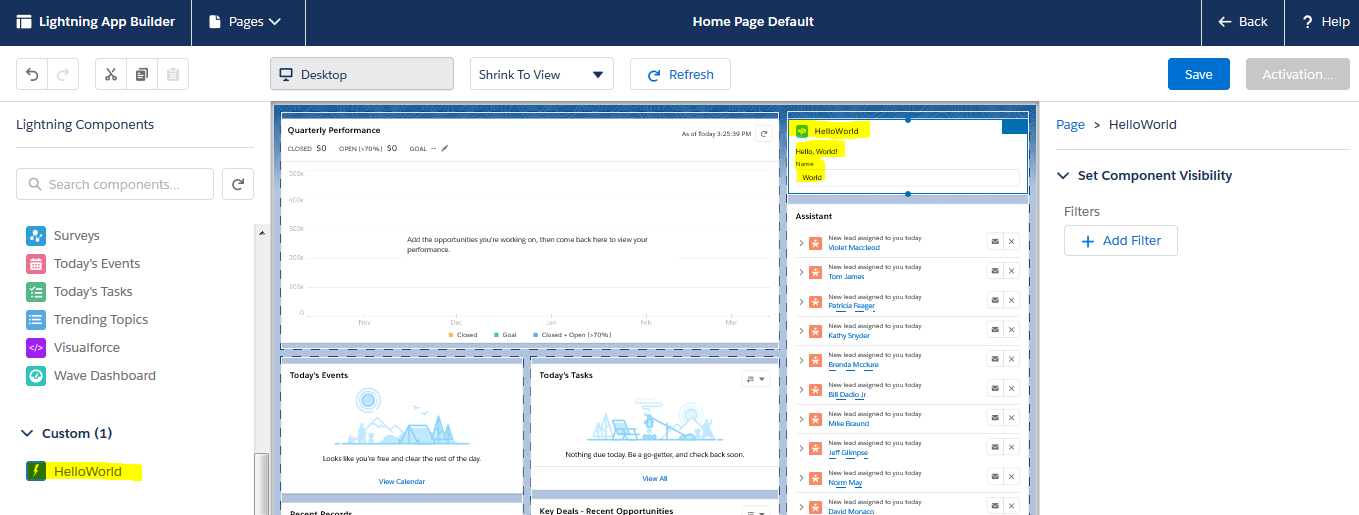
Here is your Hello World LWC.

For Live Demo Click Here
Designed with three principles in mind, Lightning Web Components framework
- Works interoperability with the original Aura based Lightning component development model
- Offers better security, better testing, better browser compatibility and better performance.
- Align with modern web standards using HTML, modern JavaScript and the best of native Web Components.
Lightning Web Components Framework builds apps with multiple tools like Webpack, TypeScript, or Babel; and runs them on multiple platforms such as Heroku, Google, or anywhere else. Leaving abstractions behind and bringing simplified component bundle structure to the table, Lightning Web Components Framework is easy to learn as it builds custom elements with HTML templates, JavaScript modules, and CSS files.
If you need any assistance creating your first Salesforce lightning web component, reach out to us on +1(415) 992-6421 or drop us a email at sales@hicglobalsolutions.com.





