




Salesforce Lightning Platform offers out-of-the-box tools and services to its users by designing and building apps faster using a variety of strategies, creating and customizing custom business logic, customizing user interfaces with its framework and its integration with third-party apps and systems easily, automating your business processes.
The lightning components are like the class definitions and tell the component what it is used for. They are used in other components or apps that create instances of a class. With this component, one can implement an auto complete support in any project.
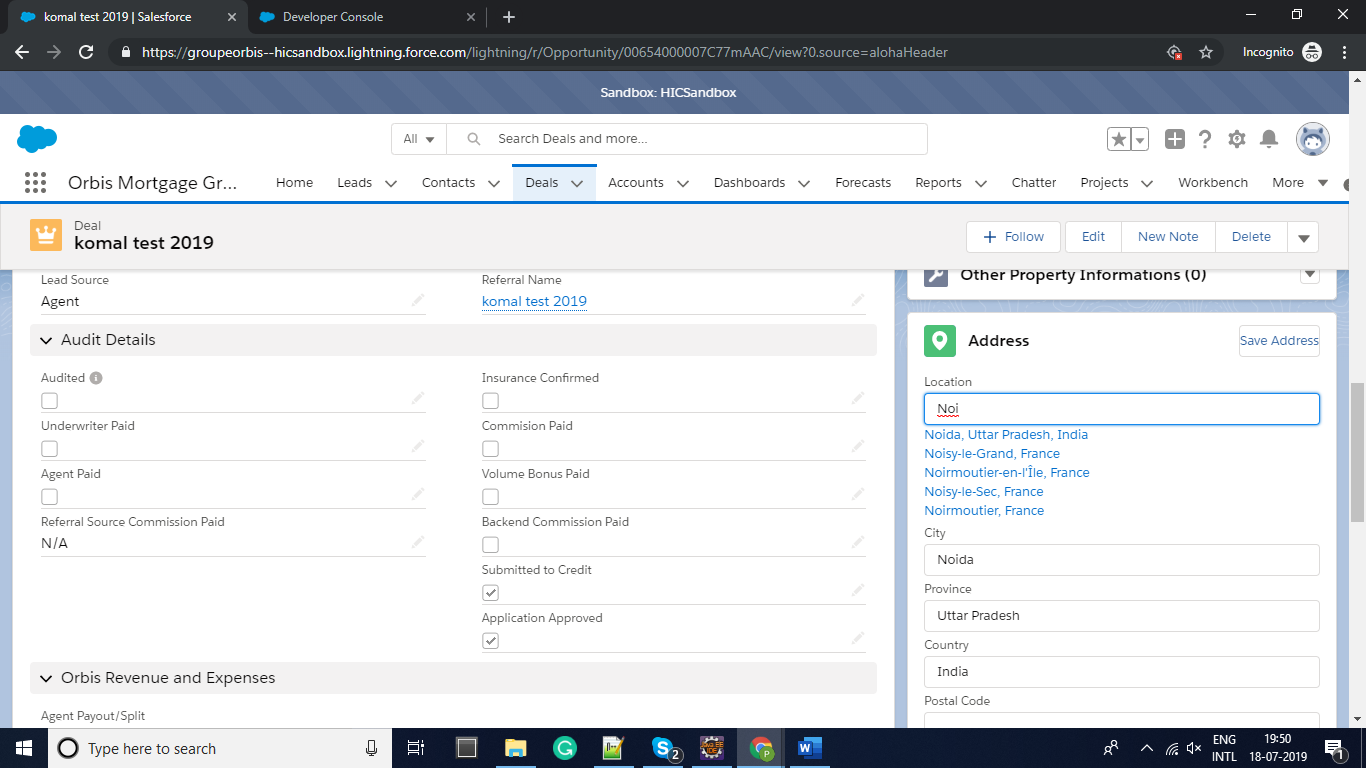
The Google API in the Lightning Component allows the user to search for the cities and created a dropdown populated with the matching records from the Salesforce objects.
The power of lightning autocomplete component is that they make the address auto-fill feature a breeze to the user. This autocomplete component is used in other components or apps that control its behaviors by specifying attribute value to its component mark-up. Users can specify the Object type, records to be retrieved and the maximum number of results to its component.
Here is a code of “address auto-suggest” or “address auto-complete” or “address auto-fill” using Google Places API with Lightning Components; to build an input form that auto-populates the dropdown with its relevant fields of addresses as you type
Standard Address auto-fill on Contact –
Steps involved in the overall Setup:
- API setup on Google G-suite account
- Develop Apex classes
- Develop Lightning Component
API SETUP
- We need to have G-suite account where we will be creating a Project.
- We need to have Places API enabled.
- The API documentation to setup the API on G-suite is – API documentation
- The first part is getting the suggestions. Below is the URL that we need for that:
- https://maps.googleapis.com/maps/api/place/autocomplete/json?input=TERM&key=YOURKEY
- Looking at the above, we’re passing in what the user is typing where it says “TERM”.
- The second part is when the user selects an item:
- https://maps.googleapis.com/maps/api/place/details/json?placeid=PLACEID&key=YOURKEY
- The above shows a “placeid” parameter that we get from each suggestion. So, when the user clicks – we pass the id to the above URL.
Build the Apex Class
- Lightning components cannot reach out to Places API directly. Google doesn’t allow CORS to their endpoints – so we simply cannot do this. Nor would we want to – because if we do this via JavaScript – we will be exposing our keys. So, we need the server to do the calls.
- We will also need to create Remote Site settings
- Remote site name – maps_googleapis_com
- Remote site URL – googleapis.com
- Activate the Remote site Settings.
- We will be creating the Address autofill feature on the Opportunity Object in this case.
- Create an Apex Class – googleAddressAutofill.
- Create custom fields on Opportunity to store the Address.
For Live Demo Click Here
LIGHTNING COMPONENT
JS CONTROLLER
HELPER
Style:
Final Result
Conclusion
When you enable this Google API address auto-fill feature on the form, your Salesforce app retrieves all the possible matching addresses from the records and fills the dropdown as they type easing the flow of filling a form.
Feel free to reach out to our expert team should you need any support on Google Places API Integration of Salesforce Lightning Components.





