




If you have been looking to store the full names of all the contacts related to an Account in Salesforce, this blog is just for you! In today’s issue, we will be sharing how you can retrieve all related contacts name on an account object using an Apex Trigger, alongside the steps for creating a new field on the account.
So, let’s get started!
Action 1: Creation of a New Field
1. Create New Field on Account

2. Select type as Text Area (Long)and click next

3. Give a name to the field and click on next

4. Now Next, Next and Save.
Now our field is created where we want to store the full names of all the contacts related to the Account. The next step is to write an Apex trigger to make this possible.
Action 2: Write an Apex trigger
1. Go to setup and in the Quick Find box write Contact and in contact click on triggers.
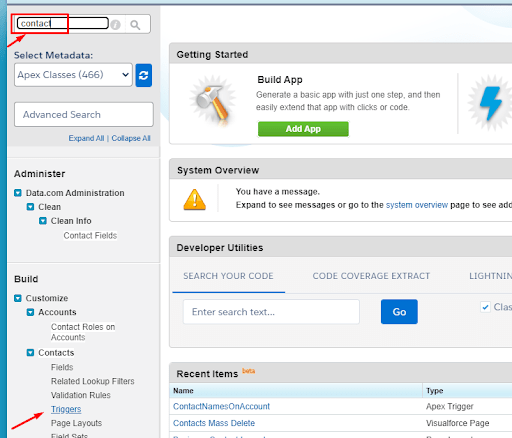
2. Click on new and write your apex trigger code.
Trigger code
Wrap Up
We hope that you liked this informative article and got to learn how to get all related contact names on an account object in Salesforce. Do not shy away from sharing your experiences with us if you try out our solution. And Stay tuned for yet another life-saving Salesforce solution soon. Happy coding!!





