

Discounting mechanisms are essential in CPQ solutions as they help drive sales, meet client expectations, and maintain competitive pricing. This article will explore the various types of CPQ discounts, how they work, and their strategic benefits.
1. Option Discount
Overview
When products are sold in a bundle, option discounts are automatically applied. Giving combined products a discount while keeping individual item costs at full, encourages buyers to buy bundles.
Key Points
- Automatic Application: The discount is applied to the bundled choices automatically, saving sales teams time and effort.
- Encourages Bundles: A discount on bundles encourages clients to buy more complete solutions, which frequently increases overall sales volume.
- Pricing Hierarchy: Cost Plus Markup takes precedence, followed by Contracted Pricing if not already utilized. If neither is applicable, the List Price is adjusted using the Option discount.
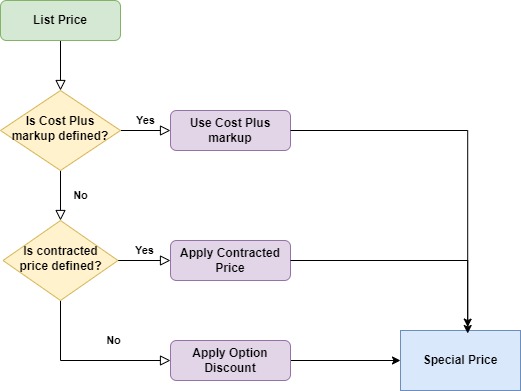
Let’s understand this with an example
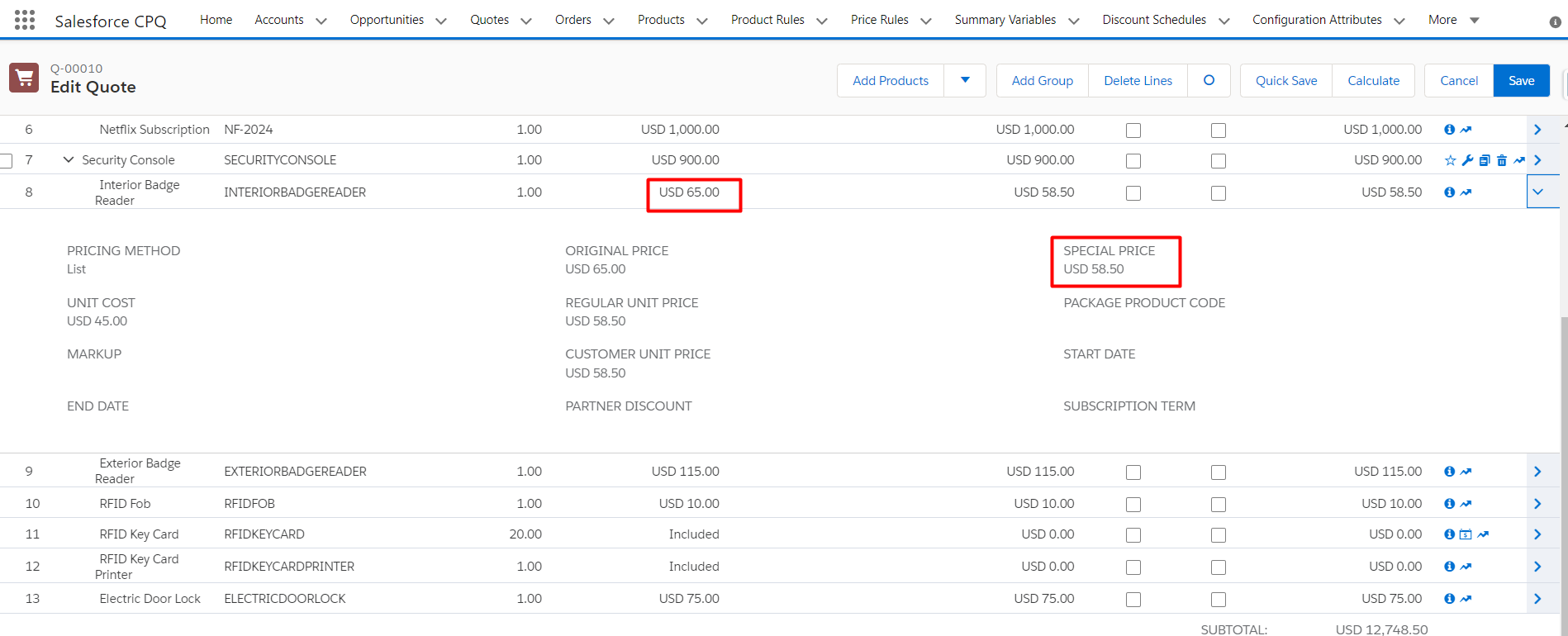
Think of a software provider that offers a collection of programs for sale. Each application costs $100 if purchased separately. When three applications are combined, the total cost is lowered to $270 after a $30 option discount.
Here are the Steps:
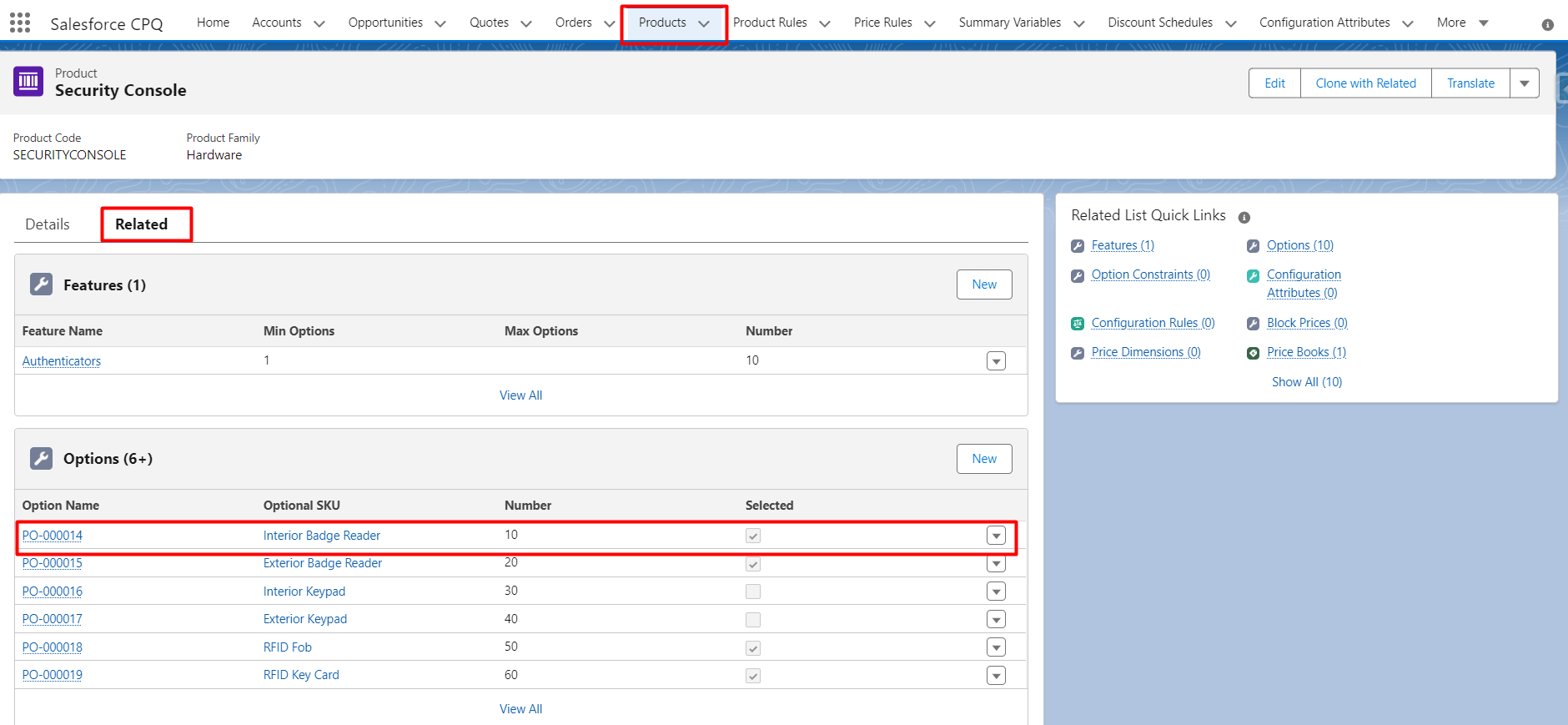
1. Click on Bundle Product
2. On Product Option select the option you want to apply a discount
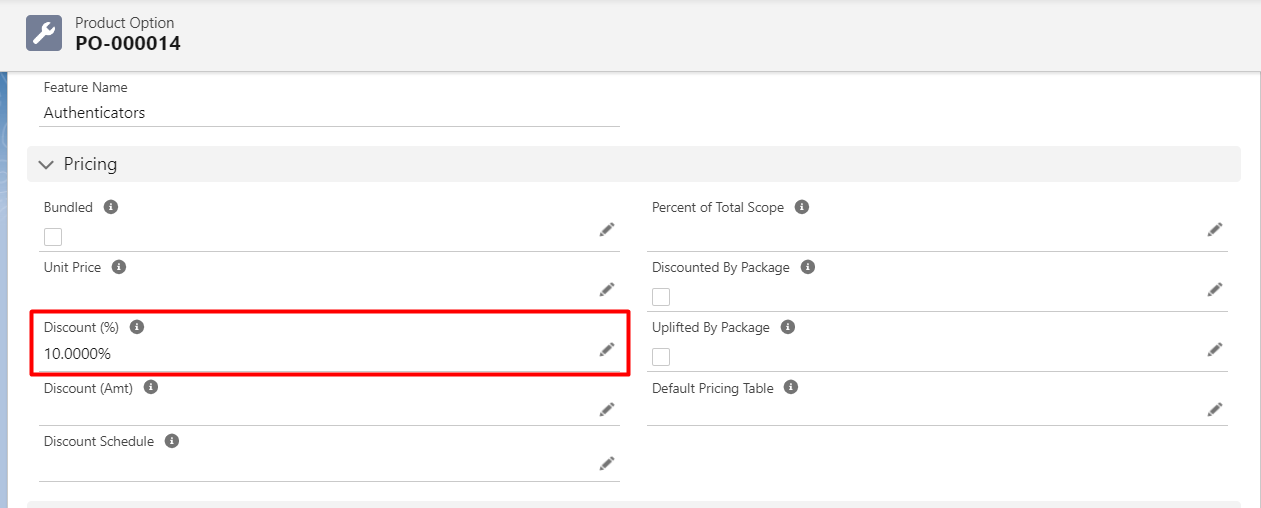
3. Add the discount % you want to apply for that particular option
2. Discount Schedule
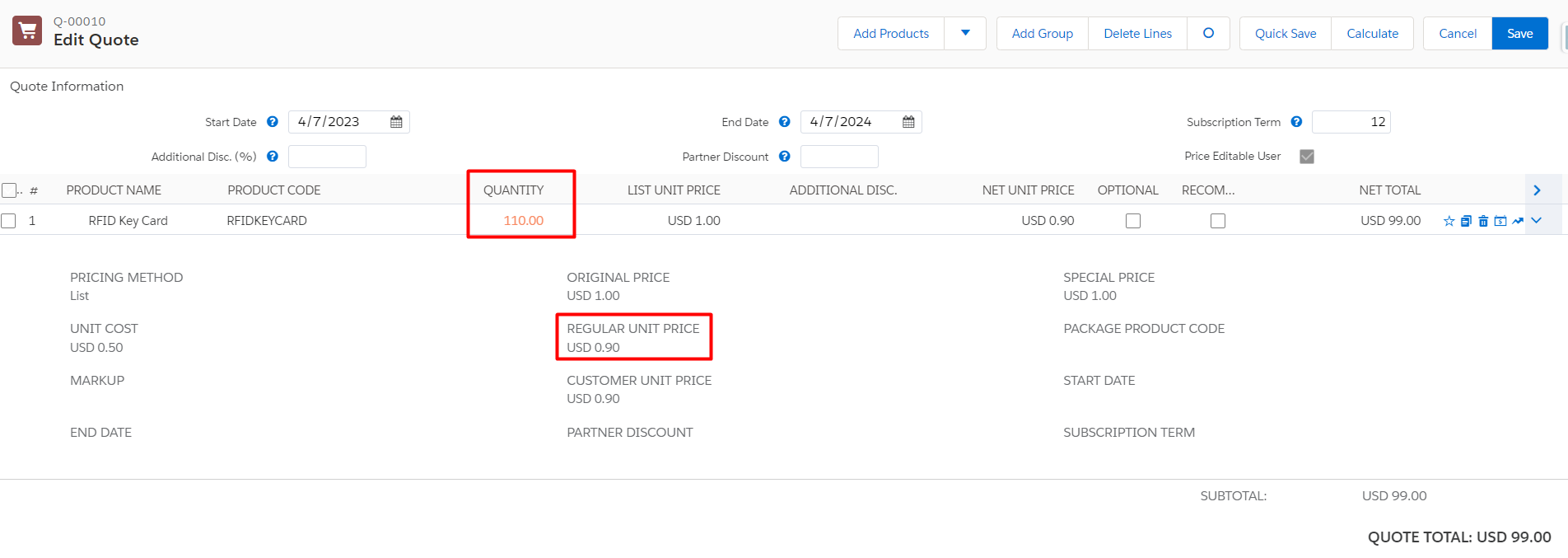
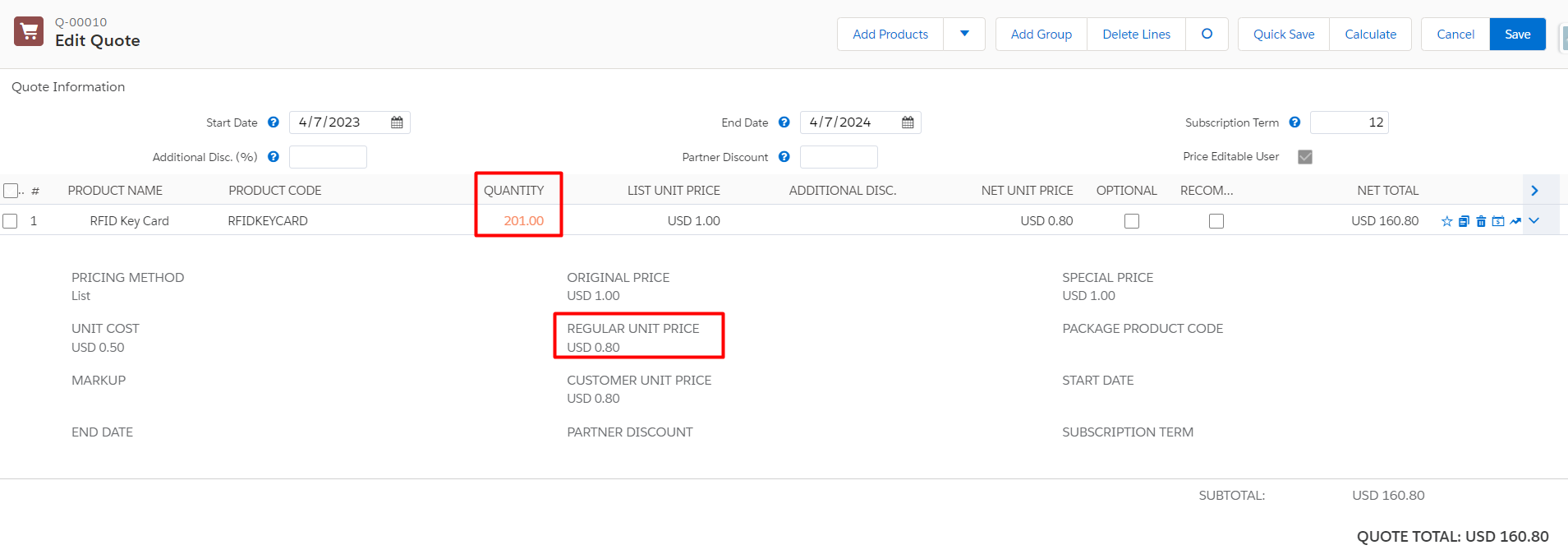
Discount schedules offer volumetric savings for quote lines based on terms or quantity. CPQ applies a discount using one of two methods (Range or Slab) based on the Type field.
Types
Range: Depending on the quantity purchased, discounts are applied consistently to all products.
Example: A 10% discount on 50 units results in a 10% reduction for each unit.
Slab: Depending on the quantity ranges, discounts are applied at varying levels.
Example: The discount for purchasing 1–9 units is 10%, for purchasing 10–19 units, it is 20%, and for purchasing 20+ units, it is 30%. As more purchases are made, the discount rises.
Note: In cases where a quote line qualifies for multiple discount schedules, CPQ determines priority based on the highest priority item. For instance, a discount schedule associated with the “Contracted Price” will take precedence.
| Object | Volume Discount Scenario | Priority |
|---|---|---|
| Contracted Price | Discounts for a specific account | 1 |
| Price Dimension | Discounts for one-time fees attached to subscription products or segments of the subscription term. | 2 |
| Product Option | Discounts only when product is sold in a bundle | 3 |
| Feature | Discount for every product in bundle feature | 4 |
| Product | Discounts whenever a product is added to quote | 5 |
Here are the Steps:
1. Click the discount schedule tab > click New > Fill details
2. Add tier to discount schedule
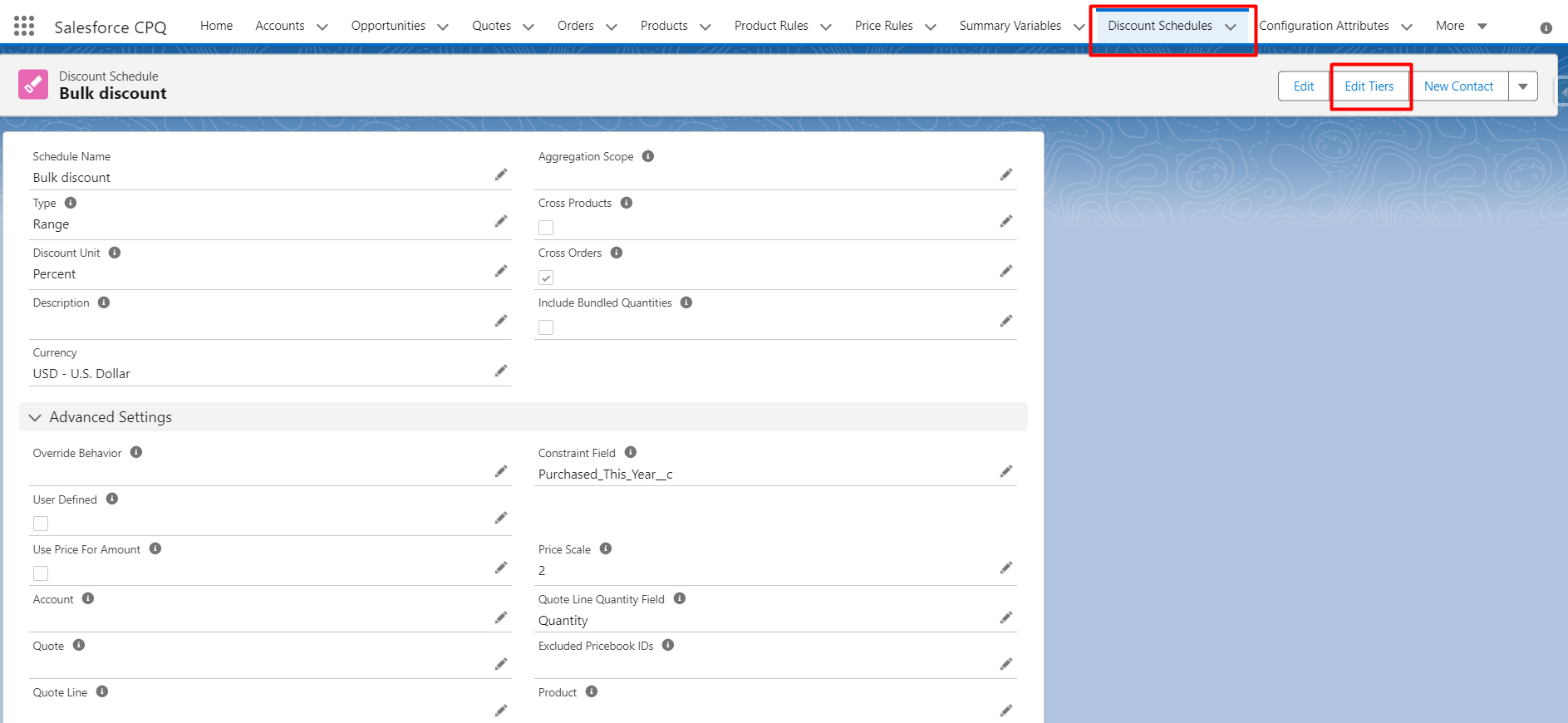

3. Click on the product you want to apply for this discount schedule.
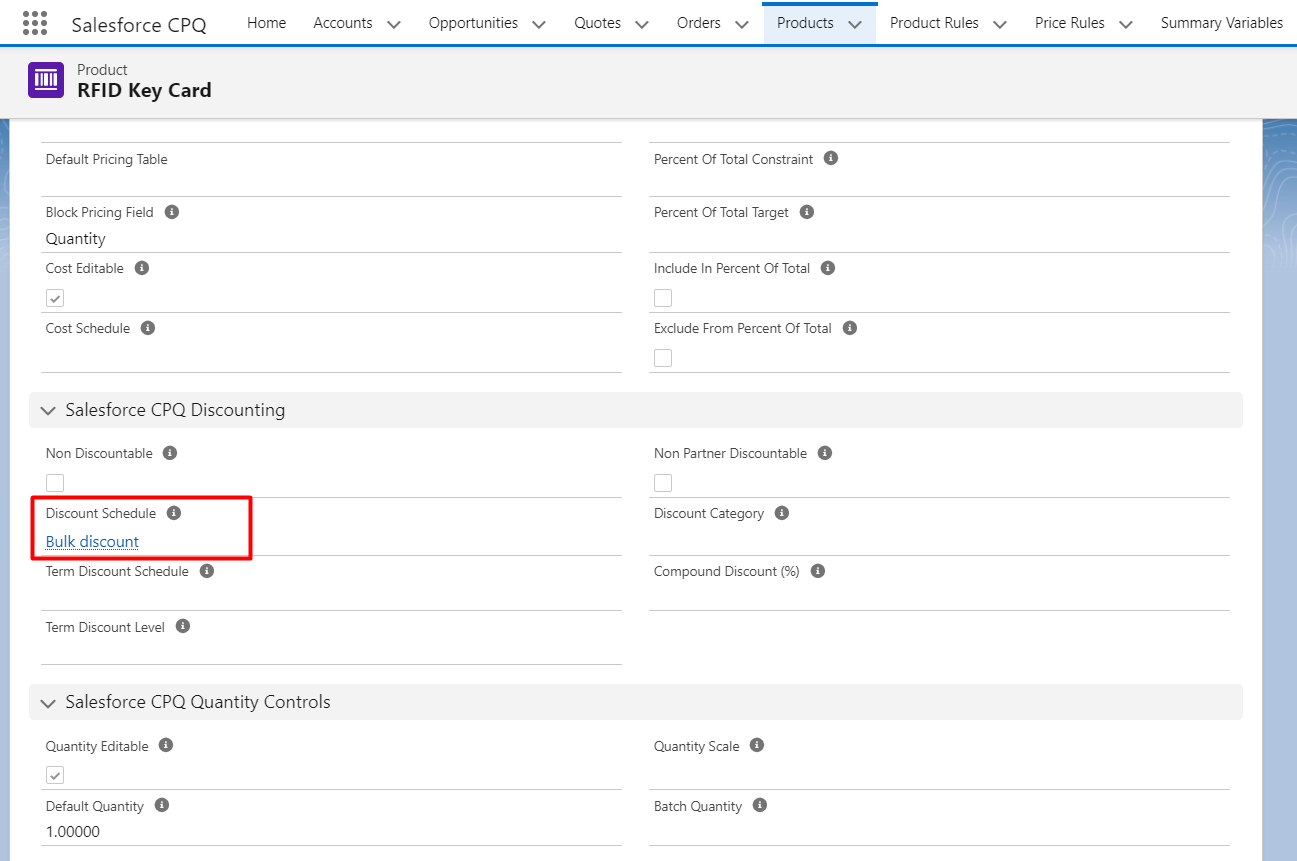
4. On the Discount Schedule lookup field of the product add a created discount schedule.
3. Compound Discount
Overview
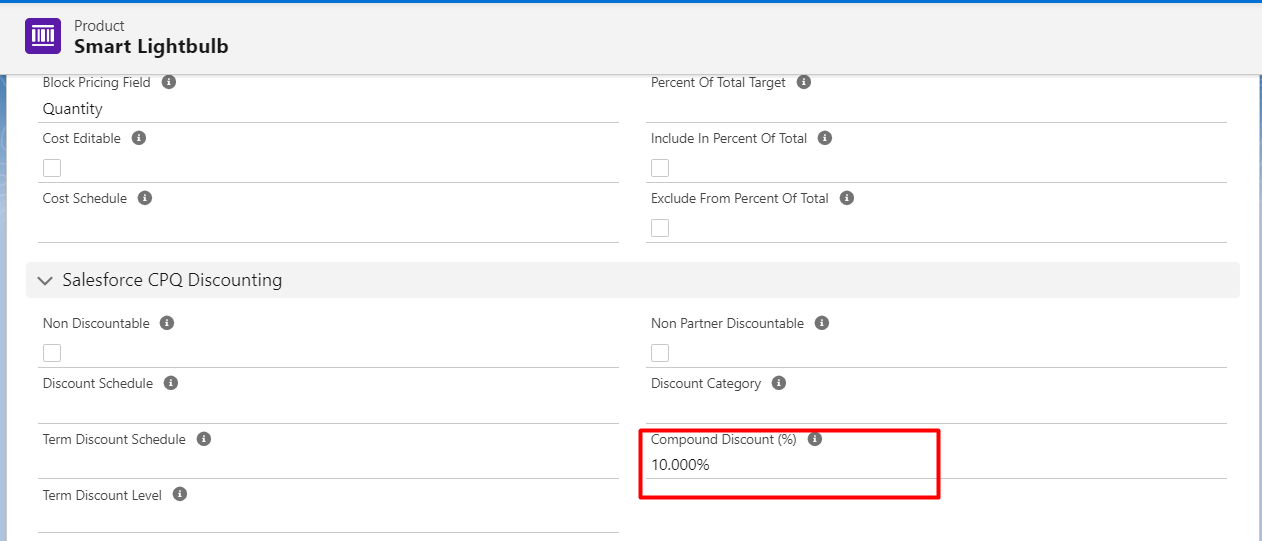
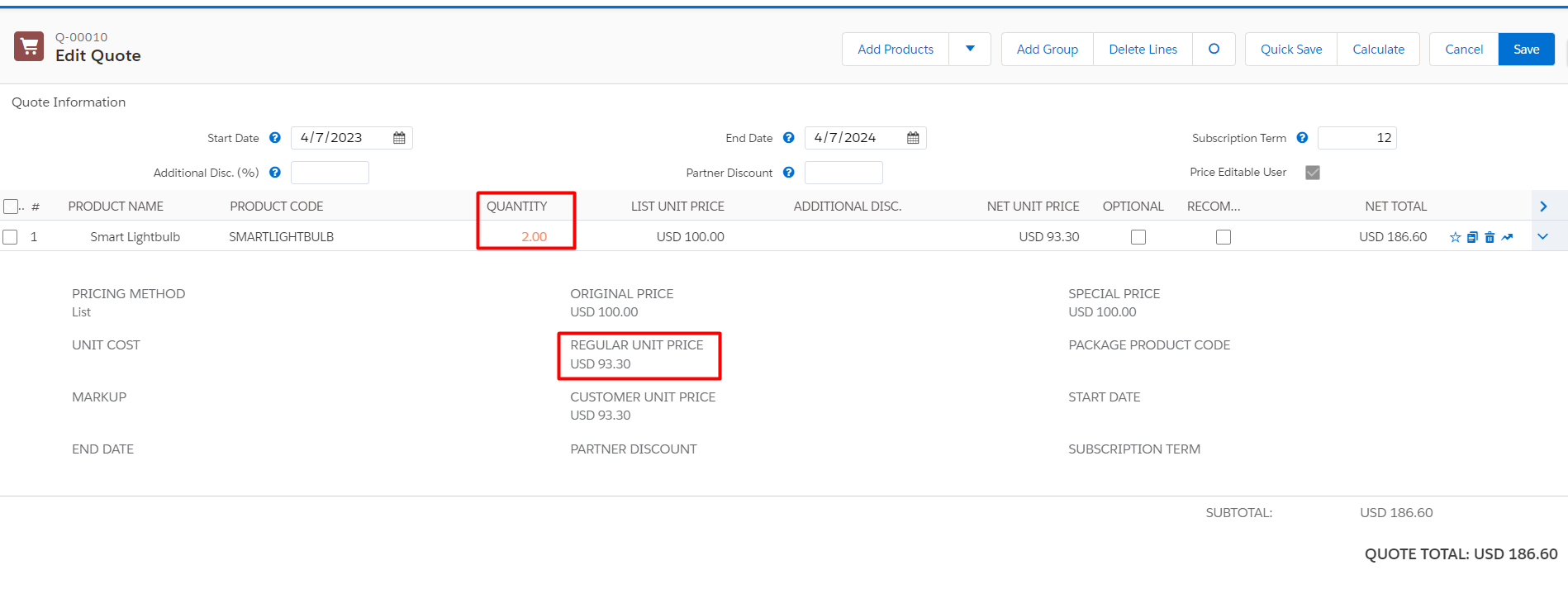
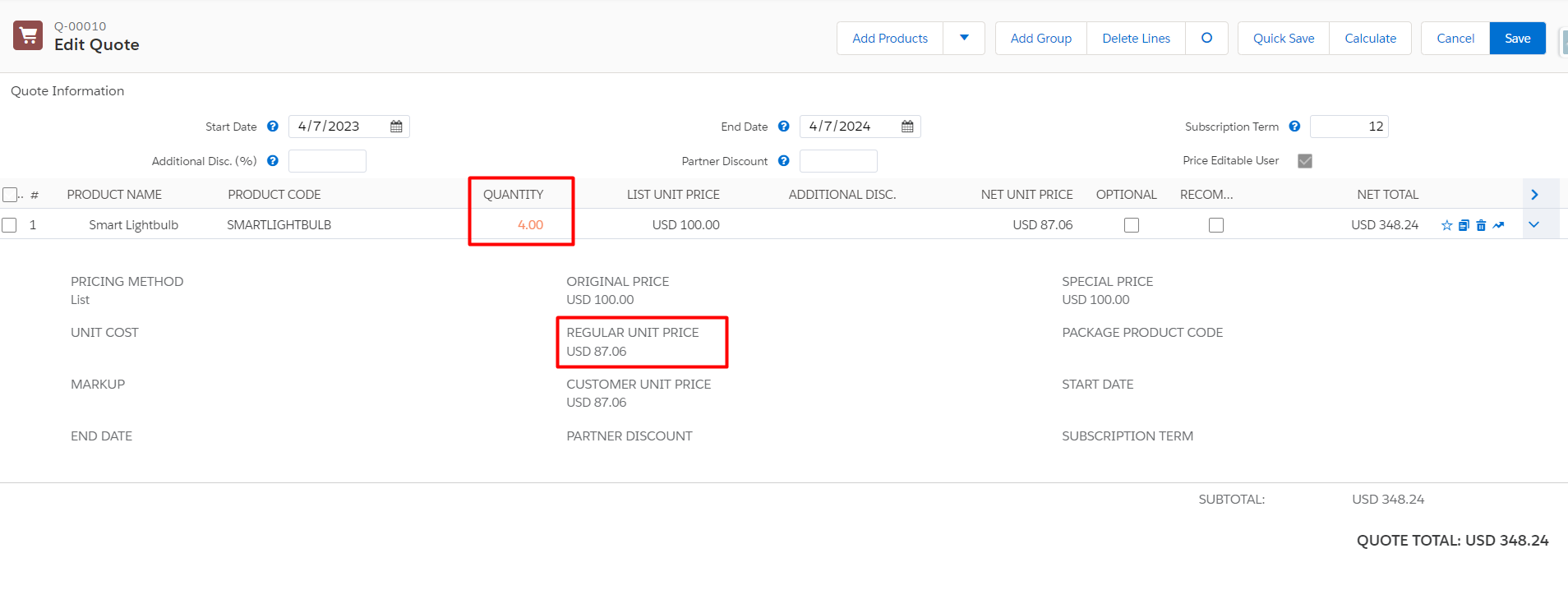
Compound discounts are computed using a certain formula and are automatically adjusted for each unit of the product:
Discount Percent = 1 / (quantity ^ (compound discount value / 100))
Key Points
Dynamic Adjustment: This offers a more detailed discount structure by adjusting discounts dynamically dependent on quantity.
Strategic Pricing: Effective for progressively raising discounts with bigger purchases, boosting the allure of larger purchases.
Here are the Steps:
1. Click on the product you want to apply a compound discount.
2. The compound discount field provides value.
4. Additional (Manual/Discretionary) Discount
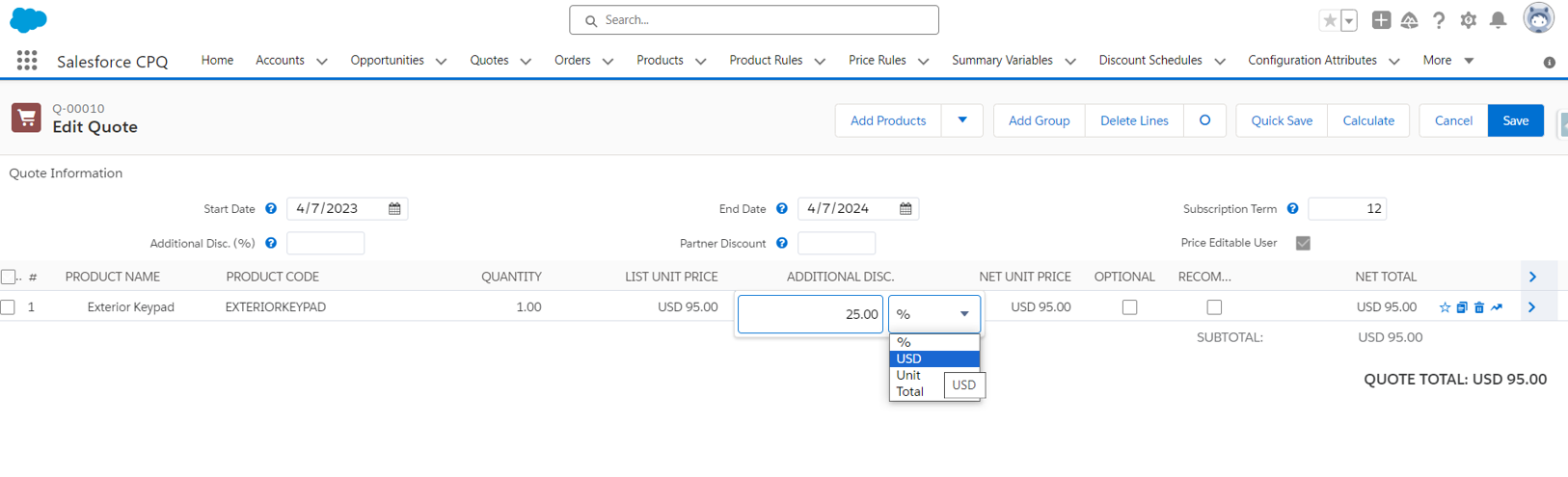
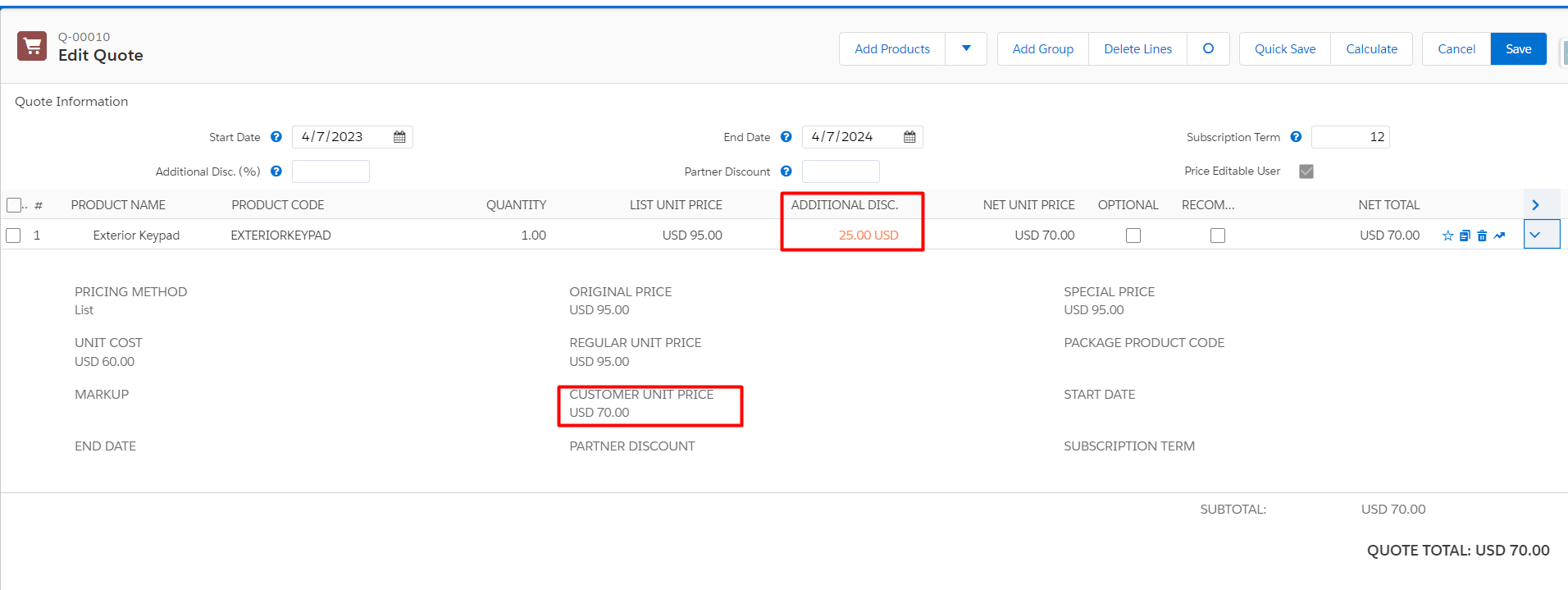
The Additional Discount section is used to manually apply these discounts. The percentage, amount, unit price override, and total line price override options are available. You can customize unit and total discount options in CPQ, which includes support for discounts in both dollar amounts and percentages.
Key Points
- Flexibility: Custom discounts can be applied by sales representatives by certain transaction conditions.
- Custom Fields: By adding custom fields to the Quote Line object, more discount types can be introduced.
- Automatic Conversion: When the quote is saved, the entered desired total or unit prices are converted to an amount-based discount.
Let’s understand this with an example
A sales representative can manually deduct 25% from a quote line to fulfill unique customer demands or competitive price circumstances.
5. Channel Discounts
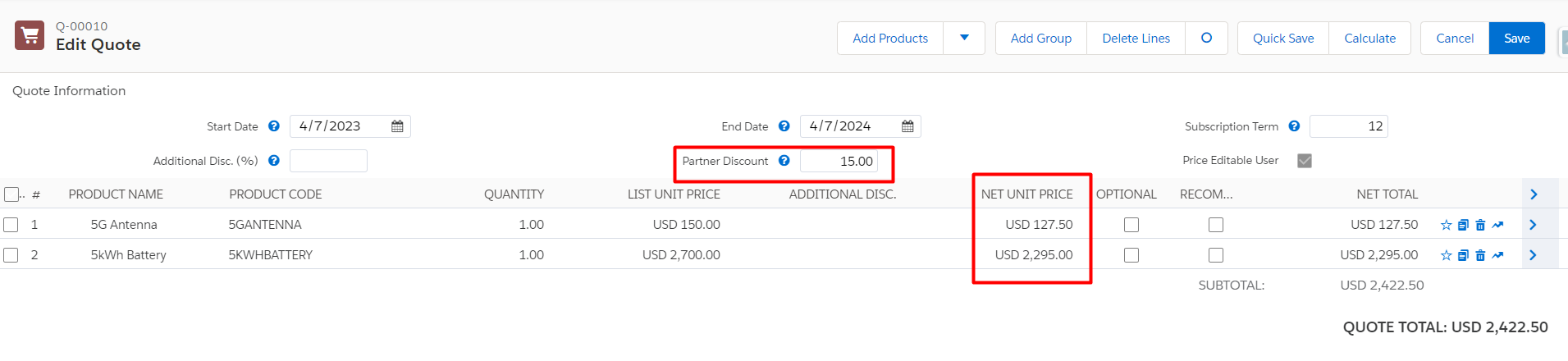
When distributors or partners are engaged in a transaction, channel discounts—including Partner and Distributor Discounts—apply. These reductions aid in channel sales management and provide incentives.
Key Points
Partner Engagement: By offering distributors and partners competitive price structures, it helps to uphold solid ties with them.
Strategic Deals: Provides increased control over indirect sales channels by guaranteeing distributors and partners adhere to pricing plans.
Lets understand this with an example
Products that a distributor resells to end users may be discounted by 15%, enabling the distributor to keep their profit and provide competitive pricing to partners.
Conclusion
Pricing strategies can be greatly improved, sales can be driven, and customer happiness can be raised by comprehending and applying these discount types within CPQ.
Businesses can adjust their pricing to different sales conditions and ensure competitive and appealing products. They must implement Option Discounts, Discount Schedules, Compound Discounts, Additional Discounts, and Channel Discounts.
Different discount types have different functions and benefits, enabling companies to tailor their strategy to match particular market conditions and sales goals.
The utilization of various discount tactics within CPQ leads to enhanced sales performance and customer connections by streamlining the quoting process and guaranteeing consistency and accuracy in pricing.
By uncovering the CPQ hidden gems, you can maximize the potential of your pricing strategies and gain a competitive advantage.
Stay tuned for more valuable insights.





